- Latest version:NOD32 AntiVirus 5.2.9
- Requirements:Windows 2000 / XP / 2003 / Vista / Windows 7
- Author / product:ESET, LLC. / NOD32 AntiVirus
- File size / license:50.14 MB
ESET NOD32 Antivirus is one of the most popular and trusted security utilities of today. Its legendary fame is supported by endless innovations in the field of antivirus protection.
Latest version NOD32 introduced optimization for low memory and CPU footprints, fast scanning, complete security package for both online and offline users and maximum protection from malicious software that can be found in online space, downloaded files, online gaming, social networks and in removable media.
Key Features and Benefits
ESET Live Grid
Cloud-powered scanning delivers optimized real-time protection against Internet threats and social media exploits.
Gamer Mode
New gaming mode lets you focus on your online gaming or important work tasks without any distractions.
Energy Saving Mode
Identifies when laptop is running on battery and automatically postpones scheduled tasks alerting you before larger update downloads.
Smart Detection
Smart Detection of malware utilizing advanced heuristic detection technology protects you from unknown threats and flags unfamiliar mutations of known malware.
Enhanced Media Control
Automatically scans all USB flash drives, memory cards and CDs/DVDs. Block removable media based on type of media, manufacturer, size and other attributes.
Advanced HIPS Functionality
This one is for real geeks – now you can customize the behavior of the system in greater detail: specify rules for the system registry, active processes and programs, and fine-tune your security posture.
Light Footprint
We’ve engineered a smart solution with extremely low system footprint ensuring fast and smooth performance for a continual level of security.
Note: NOD32 is a shareware, which comes with a 30 day trial for all Windows.
Tags: nod32 antivirus, eset nod for windows 7, antivirus free scanner, antivirus download protection, protection program, high-grade protection, virus infection, trojan, latest update
Showing posts with label Antiviruses. Show all posts
Saturday, 30 June 2012
NOD32 AntiVirus 5.0.95
AVG Free Edition 2012 12.0.2180
- Latest version:
- AVG Free Edition 2012 12.0.2180 (32-bit)
- Requirements:Windows 2000 / XP / Vista / Windows 7
- Author / product:AVG Technologies / AVG Free Edition (32-bit)
- File size / license:140.32 MB / Freeware
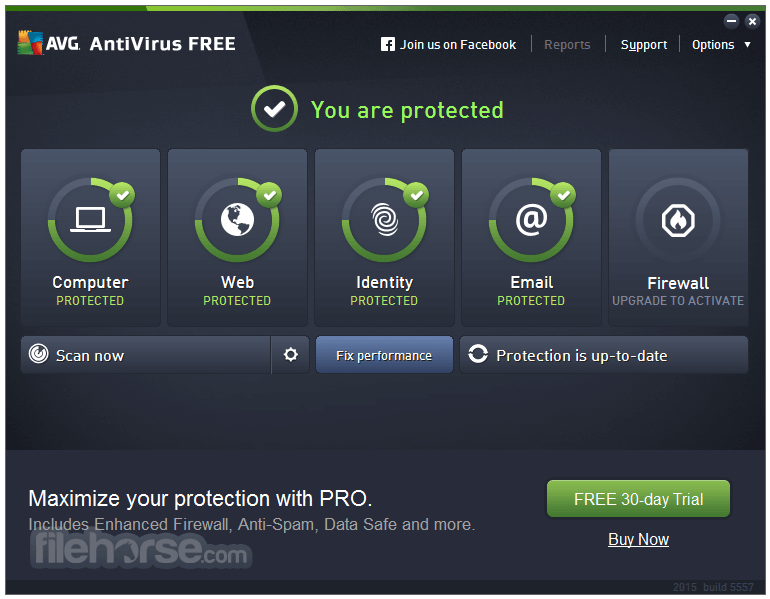
AVG Anti-Virus Free Edition is an antivirus program which is absolutely free for non-commercial use for the life of the product and brilliant protector for surfing, searching and social networking. AVG is quality Anti-Virus proven by over 150 million of users. The latest version of AVG brings new optimization for surfing the Internet, conducting web searches, or simply keeping up with friends on Facebook, AVG Anti-Virus Free has got you covered.
AVG Anti-Virus Free Edition Features:
Exceptional anti-virus protection
Anti-virus protection that automatically updates to protect you from continually evolving threats. As hackers develop new techniques, AVG’s research labs are constantly processing web data to provide new defenses to keep you automatically protected.
Gaming and surfing without interruptions
Get on with your surfing and gaming without interference. Scans operate when you are away from your PC, and it also knows when you are gaming and ensures that the security operates in the background only, leaving you free to play.
Safe downloads
Files are checked before you download them without you having to do a thing. AVG Anti-Virus will also protect you when exchanging files through popular instant messaging like MSN and Yahoo.
Surf and search the web safely
You want to search and surf, but you don’t ever want to go to any infected websites. AVG helps you out by clearly alerting you to threats and keeping you clear of them.
Share your life on Facebook, not viruses
With AVG protecting your system, you can chat and message your friends on Facebook and other social networks in the knowledge that each web page and link is checked for safety. You won’t pick up a malicious link from your friends - and you won’t send one either!
Free support from techies that care
AVG understands the need to stay safely connected to the web no matter your geographical location or time of day - our mission is to provide ongoing peace of mind on a 24/7 basis.
Note: By starting from a null position, you are required to actively choose to install AVG Free or the 30-day trial of AVG Internet Security. This is the 32-bit version.
Tags: avg free edition, avg for windows 7, avg 32 bit, free anti-virus, antivirus tool, email scanner, avg 2012, shield, real-time protection, heuristic methods, xp antivirus, win7 antivirus, trojan shield
Sunday, 17 June 2012
Nod32
Important:
Before the installation we recommend you uninstall all other security solutions, including older versions of ESET.
Click here
to learn more.
Other versions
Changelog
Version 5.2.9
- Enhancement: Added information about needing to switch SSL filtering ON when filtering HTTPs sites in Parental Control setup screen
- Enhancement: Several enhancements within Parental Control Setup and management
- Enhancement: Administrator of Parental Control can choose the role of a Windows Account by entering a person‘s age configuring Parental Control
- Enhancement: Information about not filtering Parental Control added to the Home Screen
- Enhancement: Added Statistics of Scanned Files in the Home Screen
- Enhancement: Added more information about running processes reputation from ESET Live Grid
- Support: Able to activate product using proxy server
- Support: SSL False Start in Google Chrome
- Support: SSL scanning in recent versions of Mozilla Firefox and Thunderbird
- Support: Ability to use the activation keys in product to Renew
- Added: Ability to prioritize web page exceptions within Parental Control by Windows user account
- Added: Settings for Removable Media blocking and Antirootkit (Antistealth) are located in the main GUI under Setup
- Fix: Network profile dialog window popping up repeatedly
- Fix: Graphical enhancement fixing shadowing of the pull-down quick menu
- Fix: Issues detecting emails in Windows Live Mail 2011
- Fix: GUI opened in a large window
- Fix: Advanced scanning options are not working in Computer Scan
- Fix: Irrelevant notification bubble is being shown when no action is required
- Fix: Issues with stopping of ESET service during installation
- Fix: Runtime error with HP Protect Tools, causing ESET GUI crash
- Fix: Removable media blocking does not block devices for some Windows Accounts
- Fix: Some pages with certain categories were not categorized properly by Parental Control feature
- Fix: Files are still scanned by Real-time file system protection after disabling it
- Fix: Issues with importing Antispam global lists from ESET Smart Security version 4 to ESET Smart Security version 5
Saturday, 16 June 2012
CA Anitivirus
CA Anti-Virus Plus Anti-Spyware 2012 Review
CA Anti-Virus Plus Anti-Spyware 2010 Review
By Charles P. Jefferies, NotebookReview Staff | Thursday, January 14, 2010 | 15071 Reads
By Charles P. Jefferies
CA Anti-Virus Plus Anti-Spyware 2010 is advertised to keep your computer virus-free, spyware-proof, yet still run well on a power-strapped netbook. Read our review to find out if CA's results match its claims.
Product Overview
CA Anti-Virus Plus Anti-Spyware 2010 is a $49.99 Internet protection suite for home users. It provides anti-virus and anti-spyware protection and the license is good for up to three computers. CA Anti-Virus is advertised to be netbook friendly, implying it should be light on resources. We will find out.
Download & Installation
CA Anti-Virus is a 79MB download. The install is relatively painless after starting the installer; it takes a few clicks and about five minutes to install. The wizard is straightforward, though not as slick or innovative as other products such as Norton 2010. Users are prompted to register however it is not required. Before the install finishes, the software performs a quick scan of the computer; afterwards, a restart is required to complete the install process. The majority of antivirus suites have not required a restart, though that is a trivial item to complain about.
Program Interface

CA takes employs an unconventional interface with their anti-virus suite. Instead of a traditional 2D layout with tab-based browsing, a 3D wheel-like interface allows users to easily see and select categories. I like the concept but this interface is unfortunately serves as little more than an upsell for the $69.99 Internet Security Suite since only one of the categories is actually enabled in this standard anti-virus package. I don't care for this purposeful limitation and found it annoying, considering that the Anti-Virus suite is a not-so-cheap $49.99. There are better ways to upsell a product and this is not one of them.
Clicking
on the My Computer category (the only one that is enabled) brings up
the screen shown at the right. The interface is polished and easy to
look at. The left side shows recent activity, while the right side shows
scan results and allows users to perform new scans. Users could navigate to other categories at the bottom, if they were available . . .
In Use & Effectiveness
CA Anti-Virus stayed out of the way in common tasks such as word processing and gaming. We did not notice any apparent performance decrease, such as lag when opening applications. Updates were performed in the background automatically.
To test the effectiveness of CA I used several virus files from Eicar.org, an IT security website. Please see the test description for extensive information on the tests.
CA Anti-Virus blocked the first file from downloading and while it allowed the others to download, it found two of them immediately. The other I had to scan for, which it found easily. Overall CA Antivirus suite is not particularly proactive but performs as expected.
Performance Impact
We evaluate the performance impact and system resource usage of using anti-virus software in three ways:
1. Overall system performance measured before and after installation using PCMark
2. Memory footprint
3. Time it took to perform a full system scan
Our test system is an HP Pavilion dv5t.
Overall System Performance Impact Measured with PCMark Vantage
The PCMark benchmarks as measured before (left) and after (right) the CA install are shown below.


There is no change before and after - CA indeed has an extremely small footprint, which is good to see.
Memory Footprint
CA Anti-Virus takes up about 68MB of system memory according to the Task Manager, which is significantly more than other anti-virus suites we have tested up until this point. While an extra 68MB of memory usage is unlikely to affect a modern computer's performance, on a netbook with only 1GB of RAM it might make a small difference.
Time it took to perform a full system scan
This is the kicker of this entire review - the scan time -- five hours and four minutes. The same computer with the same data is used to test all anti-virus products here, and the majority of anti-virus suites up until this point have managed to do it in less than an hour. I actually stopped the first scan at the three hour mark because I thought something was wrong, but that was not the case. CA reported it scanned many more objects than the other anti-virus suites, but we have no way of verifying whether it was in fact more thorough or not.
Conclusion
CA Anti-Virus 2010 has a very limited value proposition. It provides basic anti-virus and anti-spyware protection for home users but is not particularly proactive. Scan times were extraordinarily long. The software is feature-light next to competitors such as Norton and Kaspersky and does not offer anything unique. We like the interface but it is a blatant upsell for the more-expensive security suite since most sections are visible but not accessible. Overall while CA Anti-Virus 2010 performs as advertised, it is difficult to recommend.
PROS
CA Anti-Virus Plus Anti-Spyware 2010 is a $49.99 Internet protection suite for home users. It provides anti-virus and anti-spyware protection and the license is good for up to three computers. CA Anti-Virus is advertised to be netbook friendly, implying it should be light on resources. We will find out.
Download & Installation
CA Anti-Virus is a 79MB download. The install is relatively painless after starting the installer; it takes a few clicks and about five minutes to install. The wizard is straightforward, though not as slick or innovative as other products such as Norton 2010. Users are prompted to register however it is not required. Before the install finishes, the software performs a quick scan of the computer; afterwards, a restart is required to complete the install process. The majority of antivirus suites have not required a restart, though that is a trivial item to complain about.
Program Interface
CA takes employs an unconventional interface with their anti-virus suite. Instead of a traditional 2D layout with tab-based browsing, a 3D wheel-like interface allows users to easily see and select categories. I like the concept but this interface is unfortunately serves as little more than an upsell for the $69.99 Internet Security Suite since only one of the categories is actually enabled in this standard anti-virus package. I don't care for this purposeful limitation and found it annoying, considering that the Anti-Virus suite is a not-so-cheap $49.99. There are better ways to upsell a product and this is not one of them.
In Use & Effectiveness
CA Anti-Virus stayed out of the way in common tasks such as word processing and gaming. We did not notice any apparent performance decrease, such as lag when opening applications. Updates were performed in the background automatically.
To test the effectiveness of CA I used several virus files from Eicar.org, an IT security website. Please see the test description for extensive information on the tests.
CA Anti-Virus blocked the first file from downloading and while it allowed the others to download, it found two of them immediately. The other I had to scan for, which it found easily. Overall CA Antivirus suite is not particularly proactive but performs as expected.
Performance Impact
We evaluate the performance impact and system resource usage of using anti-virus software in three ways:
1. Overall system performance measured before and after installation using PCMark
2. Memory footprint
3. Time it took to perform a full system scan
Our test system is an HP Pavilion dv5t.
Overall System Performance Impact Measured with PCMark Vantage
The PCMark benchmarks as measured before (left) and after (right) the CA install are shown below.
There is no change before and after - CA indeed has an extremely small footprint, which is good to see.
Memory Footprint
CA Anti-Virus takes up about 68MB of system memory according to the Task Manager, which is significantly more than other anti-virus suites we have tested up until this point. While an extra 68MB of memory usage is unlikely to affect a modern computer's performance, on a netbook with only 1GB of RAM it might make a small difference.
Time it took to perform a full system scan
This is the kicker of this entire review - the scan time -- five hours and four minutes. The same computer with the same data is used to test all anti-virus products here, and the majority of anti-virus suites up until this point have managed to do it in less than an hour. I actually stopped the first scan at the three hour mark because I thought something was wrong, but that was not the case. CA reported it scanned many more objects than the other anti-virus suites, but we have no way of verifying whether it was in fact more thorough or not.
Conclusion
CA Anti-Virus 2010 has a very limited value proposition. It provides basic anti-virus and anti-spyware protection for home users but is not particularly proactive. Scan times were extraordinarily long. The software is feature-light next to competitors such as Norton and Kaspersky and does not offer anything unique. We like the interface but it is a blatant upsell for the more-expensive security suite since most sections are visible but not accessible. Overall while CA Anti-Virus 2010 performs as advertised, it is difficult to recommend.
PROS
- Polished interface
- User-friendly
Avera antivirus
Avira Download Center
Looking for a product, manual or repair utility? You’ve come to the right place.
http://www.avira.com/en/avira-free-antivirus?x-origin=web
Avira Free Antivirus
Avira Free Antivirus is not only one of the world’s most popular basic virus scanners, it’s also the easiest to use. It takes just two clicks to install and configure this free program that effectively removes adware, rootkits and other malware.
Available for:
- Windows
- Unix
Click Here to Download
Avira Antivirus Premium 2012
Premium protection makes it possible to email, chat and surf without encountering poisoned websites, phishing scams or infected email. Premium users also enjoy direct contact with Avira security experts whenever they need support.
Available for:
- Windows
Click Here to Download
Avira Internet Security 2012
Anyone who’s active on social networks, connects to wifi hotspots or streams movies needs the most powerful online protection available. Antispam, file backup, parental tools and a personal firewall are just a few of the must-have security features included with Avira Internet Security.
Available for:
- Windows
Avira Free Mac Security
Avira Free Mac Security packs award-winning malware detection into a smart application that almost never needs your attention. Just install it and continue to enjoy your Mac, free of viruses and free of antivirus hassles too.
Available for:
- Mac OS X
Avira Free Android Security
There’s nothing like a missing smartphone to make you feel lost. Use our free app to shield your data and track down your phone.
Available for:
- Android
Download Here:
Avast Antivirus free download
Avast! Free Antivirus 7.0.1426Avast Software - 71.30MB (Non-Commercial Freeware) |
avast! Free Antivirus represents the
best free antivirus protection currently available on the market. This
edition is FREE OF CHARGE for non-commercial & home use. Its
features include:
http://www.scanwith.com/download/avast_Home_Edition.htm
- Anti-spyware built-in
- Web Shield
- Anti-rootkit built-in
- Automatic updates
- Strong self-protection
- Virus Chest
- Antivirus kernel
- System integration
- Simple User Interface
- Integrated Virus Cleaner
- Resident protection
- Support for 64-bit Windows
- P2P and IM Shields
- Internationalization
- Network Shield
http://www.scanwith.com/download/avast_Home_Edition.htm
Subscribe to:
Posts (Atom)
Download Here!