Showing posts with label Audio Video Converters. Show all posts

Tuesday, 24 July 2012

All-in-one HD YouTube Video Downloader & Converter

 All-in-one HD YouTube Video Downloader & Converter


You may heard of some software that is capable of downloading videos from YouTube, or some software that enables you to convert the downloaded YouTube video to the formats that are more popular, or some software that impresses you by doing you the favor of transferring converted videos to the portable devices. It will not get you surprised until you find WinX HD Video Converter Deluxe - All-in-one HD YouTube Video Downloader and Converter Software. Learn to Convert YouTube to iPad.. 

HD YouTube Video Downloader and Converter

All-in-one YouTube Video Downloader and Converter
WinX HD Video Converter Deluxe supports the conversion of more than 210 video codec. In other words, you can use this YouTube video downloader converter program download and convert YouTube video to all video formats. You can download and convert YouTube video to AVI, MP4, MPEG, FLV, MOV, M2TS, MTS, TS, MKV, VOB, 3GP, just name a few. Or download and transfer YouTube Video to portable devices like YouTube to iPad, iPod, iPhone, Apple TV, PS3, PSP, X-box, Zune, PDA, Blackberry, Nokia, Android, Zen, etc.
Download and Burn YouTube Videos to DVD Disc.
Can not simply download the videos from YouTube and convert them, This YouTube video downloader and converter application also enables you to burn the downloaded and converted YouTube video to DVD disc. It is quite an impressive feature that makes WinX HD Video Converter Deluxe surpass all the competitors, unparalleledly.

How to Use YouTube Video Downloader and Converter?

Now get ready to give this YouTube Video Downloader and Converter a try? Firstly free download this program from Digiarty Software. With tiny file size, WinX HD Video Converter Deluxe will cost you few seconds to get it installed and launched. And it available for 5 minutes free trial or get it work by registration.
HD YouTube Video Downloader and Converter

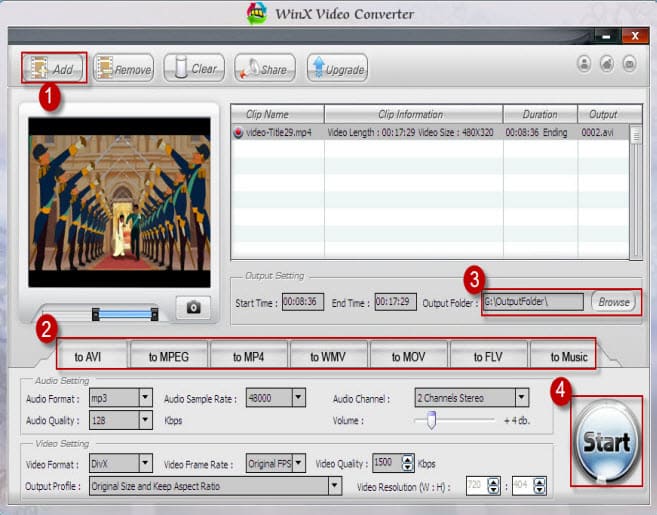
Step 1: Remove the local video by clicking Remove (clear one-by-one), or clicking Clear button (clear all videos in file list window).
Step 2: Click Add URL button and WinX HD Video Converter Deluxe will remind you enter website video URL into the following dialog box.

HD YouTube Video Downloader and Converter

Step 3: Simply click OK button to get YouTube video, Myspace video and Metacafe video downloaded.
Key Features of HD YouTube Downloader and Converter:
* Support convert and update HD camcorder, Blu-ray video to YouTube
* Convert YouTube video to iPad iPhone iPod PSP ZUNE Xbox
* YouTube Myspace Metacefe Video downloader
* Up to 15x YouTube video converting speed
* Crop YouTube video to fill the full screen

Friday, 13 July 2012

Any Video Converter Pro. All-Purpose Converter For Mobile Devices Convert Video + Download YouTube + Edit Video + Burn DVD...


All-Purpose Converter For Mobile Devices
Convert Video + Download YouTube + Edit Video + Burn DVD


 Supporting a wide range of video formats
Convert any video formats and watch any video on the go!


  • Convert video between different formats
    Convert all kinds of video formats, including MOV, M2TS, OGM, RMVB, RM, WMV, QT, FLV, MOD, TS, TP, DVR-MS, Divx, etc. to AVI, WMV, MP4, MPEG-1, MPEG-2, FLV, SWF, MKV, 3GP and 3G2 for all kinds of portable media players including iPod, iPad, iPhone, PSP; mobile phones including Google Nexus One, BlackBerry, Samsung Galaxy, HTC and Nokia and game consoles including PS3, Xbox360 and Wii. Click HERE to learn about the supported input formats and click HERE to learn about the supported output devices.
  • Extract audio from videos
    Convert video to audio formats including MP3, WMA, M4A, OGG, WAVE and AAC.
  • Excellent HTML5 Video Converter
    Any Video Converter Pro. can easily encode and create the HTML5 video online. With this HTML5 Video Converter, you can perfectly convert HTML5 videos for a wide range of portable media players, including the iPad, iPhone, iPod and etc. Learn more details from how to convert video to WebM, OGG and MP4.
  • High-Definition video converter
    Served as a high-definition video converter, Any Video Converter Pro. allows you to convert AVCHD (*.M2TS, *.MTS, *.TOD), HD MKV, HD H.264/MPEG-4 AVC, HD MPEG-2, HD MPEG Transport Stream (*.TS, *.TP, *.M2T) and other high-definition video formats to standard definition video formats. Besides, high-definition video output formats including AVI, WMV, MP4 and MKV (720P & 1080P) are also available.
 YouTube to iPod

Enjoying YouTube videos

Fully enjoy fun of YouTube videos around the world with a few clicks

YouTube to MP4, YouTube video converter
  • Built-in YouTube video downloader and YouTube video converter
    Paste URL links of your favorite YouTube videos to the program, download to your hard drive and convert to video formats you need. Downloading only or downloading and converting are available. YouTube login feature is also built-in.
  • Choose YouTube video quality
    YouTube videos are now available in a range of quality levels (Read details...). The video converter allows you to specify the quality level by menu Edit > Option > Online Video.
  • Additional online video sharing site support
    Besides, the program can download and convert videos from Google Video and Japanese NicoVideo.
  • Add "Flatten and add Faststart to MP4 files" to enable MP4 streaming
    This program adds the MP4 Faststart option to play back MP4 video in the stream way. With this function, you can upload the converted MP4 videos to the online video-sharing websites such as YouTube. While the video has been uploaded to the website, the video can be played before the entire video will be downloaded.
video editing

Editing videos easily

It's an easy job to personalize videos and make them special and different

iPod video converter, edit iPod video
  • Merge multiple files into one
    Despite the formats of the videos, you can merge multiple video files into a singe long video.
  • Clip any segments as you like
    Help you to clip multiple segments in a video by setting start point and end point as you like. Or trim a section of the video by setting start time and end time.
  • Crop frame size to remove black bars
    Crop frame size to remove black bars and retain what you want only. You can either use intuitive drag-and-drop cropping window or set crop area size, left margin and top margin to achieve the goal.
  • Personalize your video with special effects
    Adjust the brightness, contrast, saturation, rotate or flip your video, add artistic effects like noise or sharpen to make your video different and special.
  • Add your own subtitle to output video
    Prepare a .srt subtitle with your own dialogue and embed it into output video, set encoding, position, size and font for your own subtitle. (Read details...)
 Burn Video to CD/DVD

Burning video to CD/DVD disc

It's an easy job to burn your desired videos to CD/DVD disc

burn any video to cd or dvd
  • Choose DVD output format
    You can unfold Output Profile, choose Burning to DVD from the list, and then choose DVD video NTSC Movie or DVD video PAL Movie according to your TV system.
  • Customize your CD/DVD as you like with DVD Menu
    You will be prompted to choose DVD menu when the program finishes video conversion process. You can customize your CD/DVD as you like. Such as name your CD/DVD in DVD Menu Tile, browse music file from your local computer for your DVD in Background Music,change your DVD's background image in Background Image and etc.
  • Support burn video to multiple playable DVD formats
    The program supports burning video to CD-R, CD-RW, DVD-RAM, DVD+R, DVD+RW, DVD+R Dual Layer, DVD-R, DVD-RW, DVD-R Dual Layer, random access writes.
  • Easy to use
    Just with a few clicks, you can burn your desired videos to CD/DVD, so you can save or enjoy the videos freely! (Read details...)

management iPod videos

Easier operation and management

Save your time and energy and get better conversion experience

iPod video management, MP4 converter
  • Unique output video management panel
    Manage your output videos by profile or group with a file calculator. Show or hide the file management panel in one click.
  • Unique output profile management panel
    Disable or enable any output profile as you like. Keep your commonly used profiles in the front.
  • Batch video adding and converting
    Batch add video files in different folders easily with a folder selection dialog. Batch convert video files to output profile you specified and auto shutdown after encoding is also available. Take snapshot from playing video and save as .PNG picture format, create your own picture collections from movies.
  • Completely customizable parameters
    Embed useful pre-defined options to choose and completely customize frame size, video bitrate, audio bitrate by manually entering a value.
  • Process priority and multi-processing
    Set process priority from idle to realtime, support multi-processing from 0 to 8, offer you best speed to convert videos.
  • Multilingual user interface
    User interface of Any Video Converter Pro. covers 20 languages including English, Germany, French, Japanese, Simplified Chinese, Traditional Chinese, Arabic, Spanish and Portuguese.
  • Fast conversion speed with NVIDIA CUDA:
    Support for NVIDIA CUDA acceleration technology, which provides you high converting speed to save time and energy while ripping DVDs.
  • Fully optimized for multi-core CPU:
    Help you to fully take avangate of multi-core CPU to boost conversion speed. The more cores you have, the faster conversion speed you can get.
                         Click to Download

Free Video Converter for Mac - 100% Free Video Converter for Mac Users


Any Video Converter for Mac / Free Video Converter for Mac

Main Features of the Powerful Free Video Converter for Mac OS


convert video to AVI, WMV, MP4, MPG
Convert Between All Popular Video and Audio Formats

Free Video Converter for Mac is the best video converter to convert video file formats between AVI, MP4, MOV, MPEG, 3GP, ASF, FLV etc as you like. What's more, the Video Converter is also an Audio Converter. With the Free Video/Audio Converter, you can extract audio from any video files, including MP3, AAC, WMA, etc.

Customize Output Profile

Free Video Converter for Mac enables you to choose Video Settings and Audio Settings, like Encoder, Resolution, Frame Rate, Video Bitrate, Encoder, Sample Rate, Channels and Audio Bitrate. All settings can be saved as user-defined profile for your later use. The Free Mac Video Converter also enables you to rename the output file and choose the output folder as you prefer.

convert video for iPad, iPod, iPhone, Apple TV
Support Multiple Portable Devices including iPod/iPad/iPhone/Apple TV, PSP/PS3, Blackberry, Android

The Mac Video Converter supports multiple output portable devices, which offers you the most fantastic digital experience. It can convert videos to MP4, AVI, MPG, FLV, 3GP, 3G2, MPEG-I/ II, etc, so that you can enjoy any videos on various portable devices, such as iPod, iPhone, Apple TV, Gphone, PSP, PS3, Walkman, Zune, BlackBerry, Creative Zen, Archos, iRiver, Sandisk Sansa, Wii Nitendo, Nokia mobile phones and MP4 players.

User-friendly Interface and Convenient Operation

The Free Video Converter for Mac has the user-friendly interface, which makes the converting process easy to operate. This Mac Video Converter provides you with super fast conversion speed and best image and sound quality.

How to convert video with Free Mac video converter

How to Convert Video with Free Video Converter for Mac

Here the following is a brief guide on how to use Free Video Converter for Mac to convert videos for any other portable devices.

Step1: Download and install Free Video Converter for Mac
First, please download, install and run Free Mac Video Converter. Then follow the installation wizard instructions.

Step 2: Add video files into Free Video Converter for Mac
To select the video files you would like to convert, hit the Add Files button on the top left corner. In the opened Window, browse for the video files you want to convert.


Main Window of Free Video Converter for Mac

Note: You can also download YouTube video directly from YouTube.com by clicking Download button.

Step 3: Select a profile for your target device from the description
After you have added the video files into this Free Mac Video Converter, click and pull down the output dropdown list to select the output format for your devices. In the list, select your desired output format.

Step 4: Start to convert your video files with Free Video Converter for Mac
After you have set up all the conversion output profile and parameters, hit the Encode button to start converting.

HD Video Converter for Mac Keywords Related:

• Convert Video to AVI on Mac • Convert Video to WMV on Mac
• Convert Video to MKV on Mac • Convert Video to MP4 on Mac
• Convert Video to MPEG-I on Mac • Convert Video to MPEG-II on Mac
• Convert Video on Mac • Convert Video to SWF on Mac
• Convert Video to 3GP on Mac • Convert Video to 3G2 on Mac
• Convert Video to ASF on Mac • Convert Video to M2TS on Mac
• Convert Video to iPod Classic on Mac • Convert Video to iPod Touch on Mac
• Convert Video to iPhone on Mac • Convert Video to iPhone 3G on Mac
• Convert Video to Apple TV on Mac • Convert Video to PSP on Mac
• Convert Video to PS3 on Mac • Convert Video to Sony Walkman on Mac
• Convert Video to Zune on Mac • Convert Video to Zune HD on Mac
• Convert Video to Xbox 360 on Mac • Convert Video to Archos on Mac
• Convert Video to Sandisk Sansa on Mac • Convert Video to iRiver
• Convert Video to Google Android • Convert Video to BlackBerry on Mac
• Convert Video to Cowon on Mac • Convert Video to Google Nexus One on Mac
• Convert Video to Toshiba on Mac • Convert Video to Samsung on Mac
• Convert Video to Nokia on Mac • Convert Video to Netbooks on Mac
• Convert Video to Creative Zen on Mac • Convert Video to Windows Phones on Mac
• Convert Video to YouTube Video on Mac • Convert Video to iMovie on Mac
• Convert Video to M4V on Mac • Convert Video to Android Phones on Mac
• Convert Video to Tablet PCs on Mac • Convert Video to iPad on Mac
• Convert Video to HTC on Mac • Convert Video to MP3 on Mac


Thursday, 5 July 2012

Free online file converter

Free online file converter

This free online file converter lets you convert media easy and fast from one format to another. We support a lot of different source formats, just try. 

Online converter Link here, Click to Proceed  


Audio/Video Editing, Converter

Audio/Video Editing, Converter
 
Powerhouse all-in-one converter, burner, audio and video editing software for all popular audio and video formats...and much more! Some of the formats supported by the software's audio editing and video editing include MP3, WAV, WMA, OGG, MPEG-4, AIFF, M4A, AAC, AC3, FLAC, ALAC, AVI, MPEG-1, MPEG-2, WMV, and more.
Blaze Media Pro includes an audio and video converter, audio editing and video editing, video capture, audio recorder, data CD/DVD burner, audio CD burner, Video CD (VCD/SVCD) burner, audio CD copy, effects, media management, playlist, full-screen video support, and more all-in-one software application!

Free Video Converter

Free Video Converter 3.0.2.15


Click to Download


  • Latest version:
    Freemake Video Converter 3.0.2.15
  • Requirements:
    Windows XP / Vista / Windows 7 / XP64 / Vista64 / Windows 7 64
  • Author / product:
    Ellora Assets Corp. / Freemake Video Converter
  • File size / license:
    17.46 MB / Freeware

     Freemake Video Converter is a great free video converter for many reasons, but mainly because it’s fast, efficient and really simple to use. No toolbars, no sneakware, no registration, just download and use. New version features new ouput options and brings considerable improvements to the existing functionality.

    Freemake Video Converter Features:

    200+ Input Formats
    Free Video Converter accepts any video file as an input: AVI, MP4, MKV, WMV, MPG, 3GP, 3G2, SWF, FLV, TOD, AVCHD, MOV, DV, RM, QT, TS, MTS, and many more. Import music (MP3, AAC, WMA, WAV), and photos (JPG, BMP, PNG,GIF) to turn them into video free and easily! 200+ supported formats.

    Output to AVI, MP4, MKV, FLV, 3GP, MP3 and HTML5
    Convert video free to the most popular video formats. Rip DVD movie (unprotected) to AVI, WMV, MP4, MPEG, MKV, FLV, SWF, 3GP. Convert video to Flash and embed it directly to your web page. Create HTML5 video (Ogg, WebM, H.264) for modern web browsers.

    Convert Free to iPod, iPhone, iPad, PSP and Android
    Optimize videos for Apple, Sony, and Android devices. Convert videos free to iPod Classic, iPod Touch, iPod Nano, iPod 5G, iPhone, iPad, Sony PSP, PS2, PS3, BlackBerry, Samsung, Nokia, Xbox, Apple TV, Android mobile devices, smartphones, etc.

    Burn Blu-ray and DVD Video
    Convert your favourite movies to video Blu-ray format and burn high-quality BDs for free. Create Blu-ray discs out of any input content: video, audio, photos, URLs. Burn multiple Blu-ray copies and save.

    Make Slideshows and Visualizations
    Turn photos and MP3 into slideshows with background music for free. Edit your slideshow by moving, adding, deleting, and shuffling photos, or enable panorama effect.

    Upload Photos and MP3 to YouTube
    Upload videos, photo slideshows, MP3 to YouTube with our free video converter. Upload AVI, WMV, MP4, 3GP, JPG, BMP, GIF, MP3 to YouTube. The program will cut videos (if required) into 15-minute parts and insert them into one YouTube playlist.

    Cut, Join, Rotate, Limit size, Adjust to aspect ratio
    Cut unwanted parts from video files, use scene searching option. Rotate or flip video. Join several videos into one file.


Videora Zune HD Converter


Videora Zune HD Converter is a free Zune HD video converter that converts video files, YouTube videos, movies and DVD's so you can play them on your Zune HD. The software can convert all types of video files (avi, divx, xvid, flv, x264, vob, mpeg, DVD's, YouTube, etc.) into the proper video formats (MPEG-4, H.264) that play on the Zune HD. It is available for Windows and Mac.


Click to Download  
Click on the link above to see screenshots of our Mac Video Converter. Screenshots of our Windows Video Converter can be seen below.
Home Section - Version and other about information.
Video File Conversion - Converting a video file in Normal Mode.
Conversion Progress - View the progress of your conversion.
YouTube Downloads - Download and convert video from YouTube.
Video File Conversion - Converting a video file in Power Mode.
Encoding Profile - Editing a Power Mode profile.

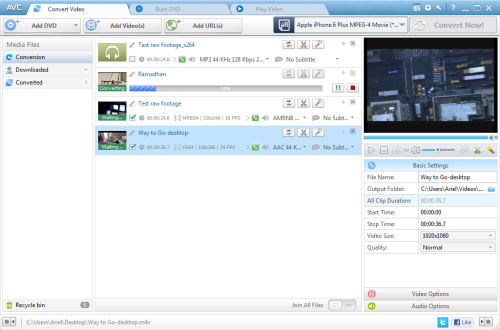
Any Video Converter


Freeware: Any Video Converter

Free Video Converter with millions of happy users!


•  Convert all videos & YouTube to MP4, MP3, etc. for various media players
•  Create HTML5 videos with embedding code ready to use for websites
•  Clip, crop, rotate or merge to edit videos as you like
•  Burn videos into DVD movie playable on TV and DVD player
•  Boost video conversion speed up to 6X faster with CUDA acceleration

  Click to Download


 Multiple Input Formats

Support 60+ input video formats including AVI, FLV, MOV, MP4, MPG, M2TS, MTS, RMVB, AVCHD, MKV, WebM(V8), QT, WMV, VOB, 3GP, 3GPP2, DivX, and more.


All Devices Playable

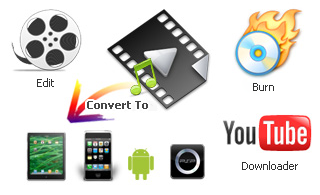
Perfect transfer video to PC, laptop, Tablets, Apple iPad, iPod, iPhone, Sony PSP, Samsung, HTC, Android, BlackBerry, Nokia, Xbox, Smartphones, etc.


YouTube Video Downloader

Download FLV, MP4, WebM, 3GP videos in bulk from YouTube, convert YouTube videos to AVI, WMV, M2TS, MKV, MP3, etc and burn YouTube videos to DVD.


Powerful Video Editing

Trim video clips, crop video, rotate video, join video, add subtitles, edit video codecs, dimension, bit rate, frame rate, sample rate, channel, video/audio quality.


DVD & CD Burning

Burn videos to a CD, DVD+R, DVD+RW, DVD+R Dual Layer, DVD-R, DVD-RW, DVD-R Dual Layer that can be played back on PAL and NTSC TV.


Fast & Friendly with CUDA

Quickly convert with CUDA acceleration technology and burn multi-files simultaneously in batch. Realize multi-threading video conversion. Auto shutdown computer when conversion finished.


          All-in-One Free Video Converter
  • There is open source software to perform almost every task for video conversion. But if you are one of these windows users who are looking for an All-in-One video converting tool with easy-to-use graphical interface, Any Video Converter Freeware provides just that, allowing you to effortlessly convert video files for FREE!
  • Free Video to Video Converter
    Whether you are looking for free AVI video converter, free MKV video converter, free FLV video converter, free MP4 converter, free iPad converter, free Android converter, or free YouTube converter, Any Video Converter Freeware is the right application for you. Download the free video converter now to convert videos and experience better digital life.
  • Excellent HTML5 Video Converter
    Free Any Video Converter can easily encode and create the HTML5 video online. With this HTML5 Video Converter, you can perfectly convert HTML5 videos for a wide range of portable media players, including the iPad, iPhone, iPod and etc. Learn more details from how to convert video to WebM, OGG and MP4.
  • Free Video to Audio Converter
    Any Video Converter Freeware is also a free video to audio converter that can extract audio from video, like convert MP4 to MP3, convert MPEG to M4A, convert AVI to MP3, convert WMV to WMA, convert MOV to AAC, convert WebM(V8) video to MP3, and VOB to MP3.
  • Free YouTube Video Downloader
    This free YouTube Downloader lets you download videos from YouTube and save them as MP3, MP4, WMV, MPEG, MKV, WebM, ASF, M2TS, DVD and other formats.

FLV Converter

Free FLV Converter 6.98 
  • Latest version:
    Free FLV Converter 6.98
  • Requirements:
    Windows 2000 / XP / 2003 / Vista / Windows 7
  • Author / product:
    Koyote Soft / Free FLV Converter
  • File size / license:
    6.01 MB / Freeware
    Click to Download  
    Free FLV Converter is lightweight and effective free tool, convert flash videos and streams to formats supported by your PC. This program is a great way to convert streamed Flash videos into something useful beyond Web pages. Supports AVI and can download embedded SWF or FLV videos directly from the Internet when you punch in the URL.

    Why Use Free FLV Converter?
  • Perform local searches with an integrated video search engine for videos you would like to convert to FLV
  • Change the basics such as settings, including output format, quality, and destination directory, as well as more advanced options like the codec, aspect ratio, and the frame rate
  • Convert all your videos to FLV format with an automatic HTML page creator
          Free FLV Converter Features:

  • User friendly interface that allows to easily grab and save videos
  • High speed conversion to many formats, including: divx, xvid, mpeg, dvd, avi, and more
  • Compatible with more than 500 video websites, including: YouTube, DailyMotion, MetaCafe, Veoh and Megavideo
  • Integrates searching, downloading and converting video files
  • Supports all popular formats
  • Easy installation
  • 100% safe to use
  • Supports: AVI, MP4, WMV, WMA and more
  • Windows 7, Vista and XP compatible