- Latest version:DivX Play 8.2.3
- Requirements:Windows XP / 2003 / Vista / Windows 7 / XP64 / Vista64 / Windows 7 64
- Author / product:DivX Inc / DivX Play
- File size / license:53.17 MB / Freeware
Click to Download
Everything you need in a media player
Don't just play your videos — play them well. Whether it's a DivX®, AVI, MKV, MP4 or MOV file, DivX Plus® Player is built to give you the best video playback performance and media management on your PC. And with the addition of DivX To Go™, DivX Plus Player is the easiest way to transfer your videos to a DivX Certified® device.
DivX To Go: Easily transfer videos
DivX Plus Player now includes DivX To Go, a new feature that lets you automatically format videos to play on any DivX Certified device. Now you can easily transfer your movies, TV shows or home videos to your DVD player, gaming console or more by easily burning a disc or saving to a USB drive. DivX To Go:
Enjoy DivX Plus advanced features
MKV video offers a great high definition experience, which is why we chose it for DivX Plus. Now, we've taken the best things about MKV and made them even better by adding enhanced playback features to DivX Plus Player like:
- Multiple subtitles and audio tracks (up to 8)
- Smooth fast-forward and rewind
- Auto-generated chapters
Manage your video library
In addition to all the features you'd expect from a great media player, DivX Plus Player also serves as a full-featured video library manager. Now you can create video playlists (by genre, date, etc.) as well as manage your downloads, including purchased movies.
Watch purchased DivX movies
Once you find the perfect movie to watch from one of our partners, DivX Plus Player takes it from there, streamlining the download and viewing process. You can also register any DivX Certified device using DivX Plus Player, making it easy to play purchased Hollywood movies on your TV or on the go.
Why MKV Rules
MKV, our choice for DivX Plus, is a flexible video container format that's perfect for high definition H.264 video. We created DivX Plus Player to give you a Blu-ray disc experience on your computer, with advanced DivX Plus/MKV features like multiple subtitles (in .srt, .ssa or .ass formats) , multiple audio tracks, smooth fast forward and rewind, and auto-generated chapter points. Check it out on our DivX Plus HD Showcase page.Surround yourself with sound
The only thing better than watching your favorite movie in HD is watching your favorite movie in HD…with awesome surround sound … while hot popcorn shoots out of your USB port. We're still working on the popcorn thing, but for now you can take advantage of great audio with native support for 5.1 channel AAC audio and Ogg Vorbis. Additionally, DivX Plus Player will support 5.1 AC3 audio if you install an AC3 Directshow filter.Enhance your audio setup
Great video deserves great audio. In order to provide the ultimate viewing experience on your PC, we've teamed up with some experts to enhance your audio setup. Don't believe it? Start your free trial and hear the difference for yourself.SRS AudioFusion DivX Edition
This audio plug-in launches alongside DivX Plus Player, or with other media players when watching a DivX video, to increase bass response from small speakers, improve dialog clarity and create a 3D audio experience from headphones. Learn more and begin a free trial on the SRS AudioFusion page.
DFX Audio Enhancer
Integrated directly into DivX Plus Player, the DFX Audio Enhancer improves stereo depth and body, boosts overall audio volume, and optimizes headphone playback to create a more natural and pleasant sound field. Choose "DFX Audio Enhancer" from the tools menu in DivX Plus Player to start your free trial.Supported formats
Keeping track of what video is in what format and what player supports what extension can be painful. DivX Plus Player works behind the scenes so you don't need to know anything about video files, containers or require an advanced degree in codec technology to enjoy digital video. For those of you that actually want to know the details of DivX Plus Player, the following table explains the native and extended format support capabilities.Video Codec Audio Codec Container Format Native support Play DivX MPEG-4 ASP MP3, AC3* .divx, .avi Play AVI MPEG-4 ASP MP3, AC3* .avi Play MKV H.264, MPEG-4 ASP AAC, Vorbis, DTS*, AC3* .mkv Play MP4 H.264 AAC .mp4,.m4v Play MOV H.264 AAC .mov Play Xvid MPEG-4 ASP MP3, AC3* .divx, .avi Play WMV WMV 7, 8 & 9 WMA .wmv, .asf Play subtitles -- -- .srt, .ssa, .ass Extended support Play AVCHD** H.264 AC3*, L-PCM** .mts, .m2ts Play MPEG-1** MPEG-1** MP1**, MP2** .mpg, .mpe, .mpeg, .m1v Play MPEG-2** MPEG-2** MP2**, MP3, AC3* .vob, .ts, .m2v Play RMVB*** RealVideo 1-10*** RealAudio 1-10*** .rmvb - * Files that contain AC3 or DTS audio tracks will play natively in most DivX Certified devices, but may require you to install an AC3 DirectShow filter to play in the DivX Plus Player
- ** These file formats may require that proper DirectShow filters be installed on the user's machine
- *** Files that contain RealVideo or RealAudio codecs may require you to install a Real DirectShow Filter to play in the DivX Plus Player
Kick-Ass © 2009 KA Films LP. All Rights Reserved.
Showing posts with label Multimedia Softwares. Show all posts
Thursday, 5 July 2012
DivX Player
Saturday, 30 June 2012
QuickTime Player 7.72.80.56
- Latest version:
- QuickTime Player 7.72.80.56
- Requirements:Windows XP / 2003 / Vista / Windows 7 / XP64 / Vista64 / Windows 7 64
- Author / product:Apple Inc / QuickTime Player
- File size / license:37.65 MB / Freeware
QuickTime Player is the Apple’s proprietary media player, which is used by millions of people all over the World. It delivers remarkable quality output, and when used for streaming media it automatically chooses the best stream for your Internet connection. QuickTime lets you view Internet video, HD movie trailers, and personal media in a wide range of file formats. And it lets you enjoy them in remarkably high quality.
QuickTime Player Features:
It’s a multimedia platform.
Video from your digital camera or mobile phone. A movie on your Mac or PC. A media clip on a website. No matter what you're watching or where you're watching it, QuickTime technology makes it all possible.
It’s a sophisticated media player.
With its simple design and easy-to-use controls, QuickTime Player makes everything you watch even more enjoyable. Its clean, uncluttered interface never gets in the way of what you’re watching. Want to speed through a movie or slow things down? A handy slider lets you set playback from 1/2x to 3x the normal speed. And you can search through individual movie frames quickly.
It’s advanced video technology.
QuickTime features advanced video compression technology called H.264 to deliver brilliant, crisp HD video using less bandwidth and storage. So you’ll experience pristine video quality wherever you watch your movies or videos.
It’s a flexible file format.
QuickTime lets you do more with your digital media. With QuickTime 7 Pro, you can convert your files to different formats and record and edit your work. Third-party plug-ins extend QuickTime technology in many different directions. And QuickTime streaming solutions let you stream your media across the Internet.
QuickTime Player is a freeware (the Pro version is paid).
Tags: quicktime player, quick time, mov player, apple player, qt player, quicktime for windows 7 64-bit, play mov files, open mov, apple media player, quick download
GOM Player 2.1.40.5106
Click to Download
- Latest version:GOM Player 2.1.40.5106
- Requirements:Windows 2000 / XP / Vista / Windows 7
- Author / product:Gretech Corp / GOM Player
- File size / license:9.84 MB / Freeware
GOM Media Player is a free multimedia viewer that is currently used by million users all around the world. One thing that separates this player from many others is wide range of advanced features, customizability, online download of exotic codecs, constant support from his developers, and most importantly built-in support for all most popular video and audio formats. That means when you install GOM Media Player he will play every multimedia file you have without any problem, without the need for installing 3rd party codec packs.
Simple user interface, powerful audio/video support and ease of use have made GOM Media Player one of the most popular video players of today. GOM Media Player offers:
Codec Finder
GOM Player includes many codecs (XviD, DivX, FLV1, AC3, OGG, MP4, H263 and more) so you won't need to install separate codecs for most videos. For those videos that require a separate codec, GOM Player will find one and direct you to a place where you can download an open source version of the codec. That way, you won't get stuck with unnecessary codecs on your system.
Play Broken AVI Files (Patented)
AVI files can't be played if the index is broken, or if the file isn't completely downloaded. This is because the index is located at the end of the file. GOM Player's patented technology enables users to view files with broken indexes or that are still being downloaded.
Powerful Subtitle Support
GOM Player supports SMI, SRT, RT, SUB(with IDX) files for subtitle. You can specify margin, location, size, resolution, font and others. You can also enable shadow, view ASF files with subtitle, karaoke subtitle mode. You can even synchronize subtitle and video if there's any mismatch.
Convenient Playlist
If you run a video file and there is already a file with a similar name in the directory, it will be automatically added to your playlist. GOM Player has a similar playlist format as M3U, PLS, ASX and you can also include and edit different media formats on that playlist as well. It's easy to create and edit your own multimedia playlist with GOM Player.
Support Different Media Types
Along with different media format such as AVI, MPG, MPEG and DAT, GOM Player also supports streaming Windows media format (WMV, ASF, ASX). You can also watch DVD-quality videos with 5.1 channel audio output.
Screen Capture
Screen capture allows you to take a screenshot of your video directly from GOM Player. Using the Burst Capture feature, you can take continuous screenshots up to 999 shots.
Advanced Features
There are an endless number of advanced features. Customize brightness, contrast and saturation. Sharpen and add noise to your video. Try the audio equalizer. Repeat a section of your video with our A-B Repeat feature. Fast forward/rewind a few seconds using left/right keys. And much more for you to discover!
Tags: gom player, gom for windows 7, video player, mp3 player, multimedia player, codec finder, play broken videos, free media apps, screen capture, most popular
Winamp 5.6.3 Full
- Latest version:Winamp 5.6.3 Full
- Requirements:Windows 2000 / XP / 2003 / Vista / Windows 7 / XP64 / Vista64 / Windows 7 64
- Author / product:Nullsoft / Winamp
- File size / license:16.53 MB / Freeware
Winamp is an award winning free multimedia player created by Nullsoft. It supports wide variety of audio and video formats, and also has extensive options for organizing, managing, ripping, burning and internet streaming of audio and video content, such as thousands of free songs and videos on online radio stations from SHOUTCast Radio and AOL Radio. In addition to the many features that come in the standard package, its 100 million+ user base has created some of the most useful and innovative plugins and themes that can be easily installed by using built-in browser.
What`s new in Winamp Full:
- Android Wifi & USB sync support
- Purchase tickets, find lyrics, & download music directly from your media player
- WebM (vp8) Support
- Windows 7 Compliant
- Winamp OrglerTM lets you track, chart and share your Winamp listening history
- Find & manage Add-ons directly in your media player
- Improved iPod Sync Support
- New iTunes Library Import
- Online Services Gallery
- Turkish, Romanian and Portuguese Language Packs
Tags: winamp for windows 7, winamp 2012 full, win amp, windows amp, mp3 player, most used player, most popular, music player, support plugins, video player, nullsoft, winap, latest version of winamp, media library
iTunes 10.6.3 (32-bit)
- Latest version:iTunes 10.6.3 (32-bit)
- Requirements:Windows XP / 2003 / Vista / Windows 7
- Author / product:Apple Inc / iTunes (32-bit)
- File size / license:73.67 MB / Freeware
iTunes is free multimedia and software organizing application for your PC. Not only does it let you to organize and play digital music, TV shows, movies, audiobooks and iOS applications, but it also enables you to synchronize all your collected data with all portables devices from Apple (such as iPhones, iPods and iPads). Process of gathering media and apps can be done by importing your own data from your PC, or on very user friendly online store that offers industry leading amounts of content. Purchases made on Apple iTunes store can be shared with all of your devices, which enable you to enjoy that content wherever you are.
If you own any of the iOS devices, use if iTunes will enable you to organize and purchase your media and mobile applications with ease. Another great addition is powerful Cloud Sync feature which transfers all of your purchases automatically across all of your devices.
What`s on iTunes:
Music
The music you love (and have yet to discover) is just a click away. You’ll find millions of high-quality, DRM-free songs on the iTunes Store all for just 69¢, 99¢, or $1.29.
TV Shows
Keep up with your TV shows. And you thought you loved TV before. iTunes brings you your favorite TV shows, commercial-free. Even in HD.
Movies
Buy or rent movies and start watching them in minutes. From comedy to drama, romance to classic, independent to thriller — movies, movies, and more movies await you on the iTunes Store.
Books
Catch up on your reading. Without lugging a book bag. The iTunes Store includes a well-stocked library of the world’s best-selling books — ebooks, audiobooks, and new interactive iBooks textbooks for iPad.
Podcasts
Find free podcasts. The iTunes Store is your source for hundreds of thousands of podcasts. What’s a podcast? Much like a radio or TV show, it’s a video or audio series about anything and everything.
iTunes U
The world’s smartest download. Discover iTunes U and never stop learning. Download lectures, discussions, language lessons, and more — all from top universities, schools, and other cultural institutions around the world.
iTunes Gift Cards
Get ready for big thanks. Yet another hit in the iTunes Store: Gift Cards. Give songs, albums, playlists, books, music videos, movies, and TV shows to anyone.
Tags: itunes 32 bit for windows 7, free music player, download media player, apple music, i tunes 2012, download apple music, record cd, cd cover creator, itunesapple, music tune, cloud player, latest version of itunes
Audacity 2.0.1
Click to Download
Latest version:
- Audacity 2.0.1
- Requirements:Windows 2000 / XP / 2003 / Vista / Windows 7 / XP64 / Vista64 / Windows 7 64
- Author / product:Audacity Development Team / Audacity
- File size / license:19.96 MB / Open Source
- Records and plays audio files
- Supports various file formats like WAV, AIFF, AU, and Ogg Vorbis
- Import MPEG audio (including MP2 and MP3 files)
- Edit your audio files by cutting, copying, pasting, and mixing them
- Large files can be edited fairly quickly
- Add different effects like echo, phaser, wahwah, reverse, and more
- Change the pitch without altering the tempo, or vice-versa.
- Record and edit 16-bit, 24-bit, and 32-bit (floating point) samples.
- Various plug-ins support
- Can be used to convert old tapes into digital media
- And many more
Friday, 29 June 2012
A software Lehra, Theka and Tampura machine for the student of Hindustani music
Click to Download
TaalPulse is a software Lehra, Theka and Tampura machine for the student of Hindustani music.
TaalPulse is created to run on portable devices (such as Compaq iPaq) but it also runs on desktop computers (Mac OS, Windows, and Linux).
Here are some key features of "TaalPulse":
· The Pulse page permits to change the pulse of the lehra, theka and drone. The main pulse control affects the lehra and theka, and is expressed in BPM (Beats Per Minute). The pulse of the drone instrument is independent from the main pulse and is not expressed in any particular unit.
· The Volume page permits to adjust the global volume and the volume of each individual instrument.
· The Score page permits to select the Taal (number of beats per cycle), and the particular Theka and Lehra for this taal, as well as a drone pattern.
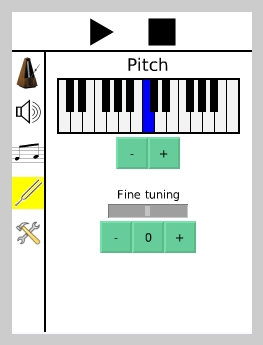
· The Pitch page permits to adjust the tuning of the Sa (tonic note). The keyboard permits to select a base note, based on the standard tempered scale. The fine tuning control permits to further adjust the pitch: a full move to the left represents a semitone lower and a full move to the right a semitone higher. The "0" button permits to reset the fine tuning to the center.
· The System page permits to quit TaalPulse and to restart it. Note that restarting TaalPulse is not recommended on PDAs (it takes a long time and might crash).
TaalPulse is created to run on portable devices (such as Compaq iPaq) but it also runs on desktop computers (Mac OS, Windows, and Linux).
Here are some key features of "TaalPulse":
· The Pulse page permits to change the pulse of the lehra, theka and drone. The main pulse control affects the lehra and theka, and is expressed in BPM (Beats Per Minute). The pulse of the drone instrument is independent from the main pulse and is not expressed in any particular unit.
· The Volume page permits to adjust the global volume and the volume of each individual instrument.
· The Score page permits to select the Taal (number of beats per cycle), and the particular Theka and Lehra for this taal, as well as a drone pattern.
· The Pitch page permits to adjust the tuning of the Sa (tonic note). The keyboard permits to select a base note, based on the standard tempered scale. The fine tuning control permits to further adjust the pitch: a full move to the left represents a semitone lower and a full move to the right a semitone higher. The "0" button permits to reset the fine tuning to the center.
· The System page permits to quit TaalPulse and to restart it. Note that restarting TaalPulse is not recommended on PDAs (it takes a long time and might crash).
Sunday, 24 June 2012
jetAudio 8.0.17 Basic
COWON - 34.23MB (Freeware)
Click to Download
JetAudio is integrated multimedia
software made up of a single compact rack. Not only does it play various
music and video files, it also has features such as CD burning,
recording, and conversion to other file formats.
You can create your own Internet broadcast by using JetCast, provided with JetAudio, and you can play all major file formats, including WAV, MP3, MP3Pro, OGG, WMA, MPEG, AVI, WMV, MIDI, RM, and video and audio CD tracks.
- Supports All Major File Formats
- Audio CD burning
- Recording
- Tag Editing including multiple file tag editing
- Multi-channel sound ouput
- Crossfade
- Skin
- Media Center window with Device Manager
- Subtitles
- Internet CD Database
- Convenient album management & Playlist
- Utilities
- Conversion
- Audio CD Ripping
- Internet Broadcasting
- Various sound effects
- Plus many more features!
K-Lite Codec Pack 8.92
K-Lite Codec Pack 8.92 (Full)17.98MB (Freeware) |
The K-Lite Codec Pack is a collection
of DirectShow filters, VFW/ACM codecs, and tools. Codecs and DirectShow
filters are needed for encoding and decoding audio and video formats.
The K-Lite Codec Pack is designed as a user-friendly solution for
playing all your audio and movie files.
With the K-Lite Codec Pack you should be able to play all the popular audio and video formats and even several less common formats.
The K-Lite Codec Pack has a couple of major advantages compared to other codec packs:
With the K-Lite Codec Pack you should be able to play all the popular audio and video formats and even several less common formats.
The K-Lite Codec Pack has a couple of major advantages compared to other codec packs:
- It is updated frequently. So it is always up-to-date with the newest and/or best components.
- All components have been carefully selected for specific purposes. It is not just a random bunch of stuff thrown together.
- It is very user-friendly and easy to use.
- The installation is fully customizable, meaning that you are able to install just those components that you really want.
- The customization abilities even go beyond the component level. Some components are able to handle multiple formats. You can specify exactly which components should handle which formats. The pack can thus be fully tweaked to your own specific needs and preferences.
- Uninstallation removes everything that was installed by the pack. Including all registry keys.
- It is extremely easy to make a fully customized unattended installation with the integrated wizard.
- It does not contain any bad, buggy or unstable codecs.
Sunday, 17 June 2012
SongBird Effortless Music Discovery
Click to Download
Songbird. Effortless music discovery on your Desktop!
Used by millions of fans to access, manage and play all their music. Let Songbird be your desktop media hub! Now includes Songbird.me so that you can easily discover new music that’s personalized and delivered straight to you. Share your music interests with your friends. Download Songbird for your Mac or PC.Media Jukebox
More features, more
power, easier to use, and now FREE.
The new MEDIA
JUKEBOX 14
Click to Download
|
|
The best digital music jukebox you will ever use, and now totally FREE! Collect, organize and play. It's that simple. |
MKV Player 4.7
What's new in Open Subtitles MKV Player 4.7 version
- MKV Player uses its built-in codecs when there is no better in the system
- A new video - VMR9 output
- Rotation of the screen: 90, 180 and 270 degrees
- New playback file formats as "webm" and "bik"
Get and give support
Share your thoughts at our forum and spread the banners. If you are interested to translate this DivX
player to your language, just look at ini files in installation directory or download
Subtitles Player
- Special efforts to effective subtitles handling and manipulation
- Intelligent subtitles handling, displayed according of user reading abilities
- Speech synthesizer for subtitle reading in subtitles player
- search and download subtitles, vote, report, upload subtitles
MKV Player
- Play DivX, mkv, wmv, avi, Xvid, DVD, MP3, MP4, VOB, 3GP, FLAC, Flash, QuickTime and others
- Supports new media formats in MKV PLayer
- Detection of missing codecs
- Live Update to the latest version of codecs, so every format is playable
- Fullscreen on 1-4 monior playback, you can view the video in fullscreen mode on TV connected to one
of the four outputs, and work on a standard windows desktop at the same time
DivX player
- Ability to play videos directly from RAR files
- Playlists support
- Password protection of media files
- Menu creator in DivX player
- Fully skinnable windows (Media list, Play list, Equalizer)
- Sound Equalizer
- Bookmarks support (add, edit)
- AVI player supports Drag-and-Drop
- Localized to many languages
- Free media converter included
- Available in many languages
- Download and convert youtube videos in YouTube player
Video Player Snapshot
Able Video Snapshot 1.6.5.22 (Video Player Snapshot) Description:
Able Video Snapshot is an application that allows you take snapshots directly from your movie!
This means you can go to any point within a video clip, capture a freeze frame picture, and save this image to your computers hard drive. There are many uses for these snapshots.
You can use these video pictures to create title slides. I like to find an interesting video scene that seems to symbolize my movie and capture a snapshot of it. You could also add a title directly to the picture using a photo-editing program.
You could e-mail hi-light pictures of your video to friends and family.
Not everyone can receive or view videos, so these pictures are a great alternative (and they don't take as long to download).
You can also use the snapshot feature to transform your camcorder into a low-resolution digital camera. Simply point your camcorder at your subject and later you can go through your video and take virtual snapshots directly off the captured video.
The actual process of taking these snapshot is quite easy. While viewing a video clip in the preview monitor, pause the clip at an appropriate spot, and click the "SnapShot" button under the preview monitor. Program will then ask you where you would like to save the picture.
This means you can go to any point within a video clip, capture a freeze frame picture, and save this image to your computers hard drive. There are many uses for these snapshots.
You can use these video pictures to create title slides. I like to find an interesting video scene that seems to symbolize my movie and capture a snapshot of it. You could also add a title directly to the picture using a photo-editing program.
You could e-mail hi-light pictures of your video to friends and family.
Not everyone can receive or view videos, so these pictures are a great alternative (and they don't take as long to download).
You can also use the snapshot feature to transform your camcorder into a low-resolution digital camera. Simply point your camcorder at your subject and later you can go through your video and take virtual snapshots directly off the captured video.
The actual process of taking these snapshot is quite easy. While viewing a video clip in the preview monitor, pause the clip at an appropriate spot, and click the "SnapShot" button under the preview monitor. Program will then ask you where you would like to save the picture.
Able Video Snapshot 1.6.5.22 (Video Player Snapshot) Security Information
You cannot download any crack or serial number for Able Video Snapshot
1.6.5.22 (Video Player Snapshot) on this page. Every software that you
are able to download on our site is legal. There is no crack, serial
number, hack or activation key for Able Video Snapshot 1.6.5.22 (Video
Player Snapshot) present here. Our collection also doesn't contain any
keygens, because keygen programs are being used in illegal way which we
do not support. All software that you can find here is freely
downloadable and legal.
Able Video Snapshot 1.6.5.22 (Video Player Snapshot) installation
package is prepared to be downloaded from our fast download servers. It
is checked for possible viruses and is proven to be 100% clean and safe.
Various leading antiviruses have been used to test Able Video Snapshot
1.6.5.22 (Video Player Snapshot), if it contains any viruses. No
infections have been found and downloading Able Video Snapshot 1.6.5.22
(Video Player Snapshot) is completelly problem free because of that
reason. Our experts on malware detection tested Able Video Snapshot
1.6.5.22 (Video Player Snapshot) with various spyware and malware
detection programs, including fyxm.net custom malware and spyware
detection, and absolutelly no malware or spyware was found in Able Video
Snapshot 1.6.5.22 (Video Player Snapshot).
All software that you can find on our servers, including Able Video
Snapshot 1.6.5.22 (Video Player Snapshot), is either freeware, shareware
or open-source, some of the software packages are demo, trial or patch
versions and if possible, we also host official full versions of
software.
Because we want to be one of the fastest download sites on the web, we
host all the software including Able Video Snapshot 1.6.5.22 (Video
Player Snapshot) on our servers. You cannot find here any torrents or
download links that would lead you to dangerous sites.
Fyxm.net does support free software, however we do not support warez or
illegal downloads. Warez is harming producers of the software.
Enjoy!
Real Player
Real Player Free Download
Click to Download
Click to Download
- Version: 14
- Downloads Count: 288,078
- License Type: Free
- Price: Free
- Date Added: Jan 24, 2011
- Operating Systems: Microsoft Windows XP, Microsoft Windows Vista, Microsoft Windows 7
- Requirements: 32- or 64-bit OS, 1.4-GHz CPU, 1GB RAM, 200MB hard disk space, Adobe Flash Player 9.0 or later, QuickTime 7.5 or later recommended
- File Size: 588.0 KB
Total Video Player
No need to install any video codecs with this small size's tool to play almost any media formats!
Absolutely free, very powerful!
Click to Download
Total Video Player is a
media player supporting 3gp, Mp4, H264, Mov, Flv and all other popular
video and audio formats (Mp3, Wma, Ogg,
Mpeg-1,Mpeg-2, etc.) as well as DVDs, CD Audio and Swf Flash Files.
Supports the following file formats:
Video Formats:
- MPEG4 (.mp4)
- H264/AVC mpeg4(.mp4)
- 3gp(.3gp, 3g2)
- WMV (.wmv)
- Zune (.wmv)
- ASF (.asf)
- SAMSUNG L55W DC (.mp4)
- CASIO (.avi)
- KODAK DC V550 (.mov)
- iPod mpeg4 mov (.mov)
- iPod mpeg4 (.mp4)
- iPod H264 (.mp4)
- iPhone mpeg4 (.mp4)
- iPhone H264 (.mp4)
- Apple TV mpeg4 (.mp4)
- Apple TV H264 (.mp4)
- Game Psp (.mp4)
- Nokia cellphone (.mp4, .3gp)
- Sony cellphone (.mp4, .3gp)
- Ms Mpeg4 AVI (.avi)
- Divx AVI (.avi)
- Xvid AVI (.avi)
- H264 AVI (.avi)
- Mjpeg AVI (.avi)
- HuffYUV AVI (.avi)
- Swf Video (.swf)
- FLV video(.flv)
- Gif Animation (.gif)
- NTSC, PAL DVD
- NTSC, PAL SVCD
- NTSC, PAL VCD
- Mpeg4 Mov (.mov)
- Apple Quicktime (.mov)
- HD Mpeg TS (.ts)
- MPEG1 (.mpg, mpeg)
Audio Formats:
- WAV
- CD disc
- MPEG audio(.mp3, mp2)
- Ms WAV (.wav)
- Ms WMA (.wma)
- OGG (.ogg)
- Amr audio (.amr)
- Awb audio (.awb)
- AC3 (.ac3)
- SUN AU format (.au)
- m4a (mp4 audio)
- aac (aac audio)
- mmf (mmf audio)
- Flac (flac audio)
Windows Media Player 11
The media player for all your digital entertainment needs.
Windows Media Player 11
Click to Download
Overview
Windows Media Player 11 offers great new ways to store and enjoy all of your digital media. It's easier than ever to access all of your music, video, pictures, and recorded TV on your computer. Play it, view it, organize it, and sync it to a portable device for enjoying on the go, or share with devices around your home - all from one place. Windows Media Player 11 is designed to work with all editions of Windows XP Service Pack 2 (SP2), and can also be used to restore Windows Media Player and related technologies to N and KN editions of Windows Vista.PLEASE NOTE: Many of the great stores you know in Windows Media Player 10 are available in this version of the Player. Check out a list of online stores at the
System requirements: Supported operating systems: Windows XP Service Pack 2, Windows XP Service Pack 3.
Instructions: This download is available running genuine Microsoft Windows. Click the Continue button in the Validation Recommended section above to begin the short validation process. Once validated, you will be returned to this page with specific instructions for obtaining the download.
Subscribe to:
Posts (Atom)