Showing posts with label Data Recovery Softwares. Show all posts

Saturday, 7 July 2012

Easy Data Recovery

Easy Data Recovery
For Windows 
Easy Data Recovery is a do-it-yourself non-destructive data recovery program for Windows operating system that supports the FAT and NTFS file systems.
It designed for recover any deleted or lost data. It even can recover files and folders from formatted, lost, deleted or reformatted disk. and it supports both quick scan and full scan modes. The software easily recovers data from hard disks, digital cameras, and any type of storage media - flash drives, USB drives, memory stick, multimedia card, secure digital card.
An easy way to download your desired software just click the link blow.


Easy Data Recovery for Mac 

Mac data recovery software will help you rescue your lost or inaccessible files from any imaginable data recovery disaster.
Powerful and easy-to-use Mac Data Recovery application that provides complete recovery of lost, deleted, corrupted, RAID volumes, formatted data, and even from initialized disks.... almost anything!

Mac Data Recovery is also completely safe to use since it does not attempt any risky repairs to the drive it's scanning. It is the safest, advanced data recovery software for Macintosh System.
The software supports both HFS and HFS+ partitions. and is compatible with Mac OS X 10.4 and higher. 
An easy way to download your desired software just click the link blow.
                                       
                                         Click to Download

Data Recovery


Welcome to Data Recovery Pakistan.

Data Recovery Pakistan is one of the renowned data recovery services across the region. We excel in providing the best recovery solution for Hard disk, RAID disk, Laptop and other Removable media storage devices. Our experienced and hard working engineers work 24 hours a day to restore and recover data.

Data Recovery Pakistan is working on all types of storage media for recovery of lost data. We have a dedicated recovery team which is making the best use of high-tech and state-of-the-art data recovery techniques. We offer a reliable, satisfactory, fast and cost effective data restore service. When the data seems to be in great danger of loss and there are slim chances of recovery then Data Recovery Pakistan would be the one to catch you falling from the edge.


Our data recovery services include recovery of Hard disk, RAID disk, Laptop and Tape drives. Data Recovery Pakistan's expert recovery engineers restore all the data from damaged devices.
Hard Drive Recovery
Hard Drive Recovery
Hard drive recovery for IDE, SCSI, and SATA drives including internal and external hard drive and drives in external USB/Firewire case.
Raid Recovery
Raid Data Recovery
RAID data recovery services for all types of RAID including RAID 0, RAID 1 and RAID 5 by Data Recovery Pakistan.
Laptop Recovery
Laptop Recovery
Laptop data recovery services from all brands of Laptops, all types of Laptop drive including IDE and SATA and from all size of Laptop drive.
Data Recovery form Tapes
Tape Data Recovery
Tape recovery using advanced technologies and techniques such as Cleansing, re-spooling and re-configuration from all types of Tapes.
FAT 16/32 - NTFS
File System Recovery
All file systems are recovered which include Windows FAT16/32, NTFS, UNIX File system, Linux File system, Mac Operating system.

Data Recovery Pakistan has a leading position in the list of data recovery companies. Data recovery for Removable media including External hard drive, Flash drives and Memory Card is carried out by using latest techniques in our recovery labs.

Data recovery is dependent on the way the process of restoring data is performed. Our recovery process is performed not only in safe environment but also by highly trained professionals keeping data privacy as our prime object.

Windows Data Recovery Software can recover data from hard drive partition which has logical corruption. Windows data recovery software recovers data from hard drive partitions which have been deleted or formatted. Geeksnerds data recovery software can recover from FAT12, FAT16, FAT32 and NTFS file system. This professional data recovery software works efficiently for all version of Windows operating system.

Mac Data Recovery Software   Buy | Download Demo

Mac Data Recovery Software recovers lost, deleted, formatted or inaccessible data, files and folders. It recovers data from hard drive partitions having HFS and HFS+ file system. Mac data recovery software recovers data from internal hard disk drives, USB hard drives, Memory Cards etc. Mac data recovery software can recover documents, music, application and many other recognized file formats. It runs on Windows OS and recovers data from Mac drives.

Photo Recovery Software    Buy | Download Demo

Photo Recovery Software recovers lost digital images, photos and pictures. It shows thumbnails of lost and deleted images and raw camera formats. Geeksnerds image recovery tool can recover, retrieve or undelete digital images, photos and picture file from hard disk drive, portable drives, removable mass storage devices (flash USB drive, memory stick, mini disk, compact flash) and memory cards including MMC, SD, XD, Micro SD and Mini SD.

Email Recovery Software    Buy | Download Demo

Email Recovery Software recovers emails which are deleted and inaccessible due to PST, OST, DBX and EDB files corruption. Email data recovery software can recover from Microsoft Outlook, Outlook Express and Windows Address Book. Email recovery software facilitates in recovering inbox messages, sent items, drafts, outbox, deleted items, junk mails, contacts, calendars, tasks, memos, appointments and users created folders. Email messages are recovered with original attributes i.e. dates, time of sending/receiving, attachments and Unicode characters. Software can also fix damaged or corrupt PST, OST, EDB, DBX, EML, WAB and VCF files.

Linux Data Recovery Software  Buy | Download Demo

Linux Data Recovery Software recovers lost or corrupted data from EXT2, EXT3 and EXT4 hard drive partitions. Linux data recovery software demo version can scan EXT based file system for data and partitions. Linux Data Recovery Software recovers data from hard disks, Raid Arrays, Laptops, Flash based Devices. It runs on Windows based system and can recover data without any limitation to size or type. It has raw scan which can scan for data and files in case file system is unknown or has severe damage.

XFS Data Recovery Software   Buy | Download Demo

Linux XFS Data Recovery Software recovers and restores lost, formatted and corrupted files and partitions of Linux based operating systems having XFS file system. It is an easy to use and simple recovery tool with free data scanning in demo version. Linux XFS data recovery software is developed with latest tools and techniques. It recovers files in almost all situations of data loss and from nearly all brands and models of hard disk drives.

JFS Data Recovery Software   Buy | Download Demo

Linux JFS Data Recovery Software recovers and restores lost, corrupted or missing files, folders from hard drive partitions. JFS data recovery software is a recovery tool with demo version for free scanning of lost data. Our data recovery software recovers JFS files created by all flavours of Linux including Red Hat, fedora, desktop Linux flavours and Linux for servers. This powerful data recovery tool runs on Windows OS and recovers JFS data and partition.

Reiserfs Data Recovery SoftwareBuy | Download Demo

Reiserfs Data Recovery Software recovers corrupted, deleted, formatted damaged files and partitions of Linux based operating systems. Reiserfs data recovery software is a user-friendly data recovery program. Reiserfs data recovery software scans for corrupted, deleted and formatted files and partitions. Reiserfs data recovery tool runs on Windows OS and recovers missing files in almost all situations of data loss.

Drive Clone Software     Buy | Download Demo

Drive Clone is cloning software to clone drive and partition having bad sector. Cloning is the vital step in data recovery of hard drives. Drive Clone mirrors healthy area of a drive first, and then tries to clone area, which has bad sectors. In addition to data recovery, the drive cloning utility can be used to make mirror or image of drive or partition for backup and data migration from one partition or drive onto another. Drive Clone is a Windows based application which can clone data from any type of file system and storage device.

Drive Wipe Software     Buy | Download Demo

Drive Wipe Software erases data from hard drive permanently. The advanced wiping algorithms wipes data in such a way that it becomes unrecoverable even by using any data recovery software. Data Wiper can erase data irrespective of data type and file system from a drive or partition. Data Wiper Software can wipe data from all types of storages including hard disk drives (SCSI, IDE, SATA, SAS), removable media, and USB External Hard drive.

Data Backup Software    Buy | Download Demo

Data Backup Software is a system backup program which can backup and restore data from hard drives and partition. This computer data backup program takes less time for backup and it can compress data to save disk space. This incremental backup utility is equipped with a scheduler which makes the backup process automated. System backup software can secure the data in its encrypted mode apart from its restriction to access the restore by a password protection.


Professional USB Data Recovery Software

Professional USB Data Recovery Software


USB Data Recovery Software retrieves deleted, lost or formatted files from USB:  

Click to Download

USB Data Recovery Software recovers lost, deleted and missing data from USB files. Data means raw facts and figures. It also includes pictures, word files, videos etc. This data means a lot to anyone who uses computer at their homes or work. Thus the protection of such data is definitely important. If this data becomes obsolete by any logical or physical data loss problem then users have to face disastrous situation of data loss. In IT world, data loss issue is believed as most misinterpreted factor. Lack of information in regard to data loss is publicly provided to the users. That’s why more and more people are becoming a target of data loss. Due to the fact, they cannot make wise decisions to retrieve their data correctly. To get out of this situation, there are many techniques that can be used to recover lost data in few clicks. Like, proficient USB Data Recovery Software (s) are commonly found in market that can recover lost data instantly.
Now let us talk about some fundamental causes behind the data loss. Users can lose their data because of whether logical or any physical errors. Are they some sort of viruses or malwares? Don’t know? Well no need to be upset at all because I am going to let you know about them. Initially let’s start with logical data loss errors. Logical data loss factors are also called ‘Soft’ or ‘non-physical’ errors. These problems mainly occurs because of damage in ‘file system’ or any ‘user error’. Similarly, physical destruction can happen because of hardware or production defects or design faults etc.

Features in usb data recovery software:

Now let’s discuss these two of them in detail. Logical data loss issues include; computer viruses, inadvertent deletion of files, backup failure, configuration errors, over written disk etc. On the other hand physical reasons may include; System exposed to severe weather conditions, imbalance disk platter due to any collision, natural catastrophes such as loss in power supply or surge. So as a result, for logical errors you can restore your data through ‘Do It Yourself’ principle. That can be done by using any of the effective usb data recovery Software. However, if you find any physical data loss issues then I would suggest you to bring in your computer to some respected data recovery expert present in your town.
Now the question is, which USB Data Recovery Software should be preferred to recovers data, in case of logical problem? What does it do? This Recovery software simply recovers destroyed, lost or deleted files from FAT and NTFS partitions with the help of some quality benefits in it. Now here you will use your intelligence. Based on major cause of data loss, the recovery tool must be chosen. Besides this, the properties of that recovery tool should be of high quality. Otherwise the outcome could be disappointing. Now again the question arises here, that what elements we should look for in any recovery software? So the answer to this question can be given with the help of these attributes. Efficient recovery tool must include such attributes;
USB Data Recovery Software
• Recovery of incidentally deletedfiles.
• Recovery of deleted files from emptied recycle bin.
• Recovery of data from reformatted, wiped, corrupted or missing partitions.
• Consist of Thorough and quick Scan methods for searching removed or lost partition.
• Contains Preview of files even before their recovery.
• Can recover files which were wiped with the use of SHIFT+ DELETE keys.
• Includes scanning algorithms that format all the directories and sub directories like before.
• Support long files and there names.
It is observed from the above discussion, that data loss can happen because of logical or physical data loss reasons. Therefore the logical errors can be fixed by using efficient USB Data Recovery Software but physical errors cannot be solved. If any physical accident occurs, only a data recovery consultant can resolve the situation. Therefore avoid becoming a victim of data loss by studying more about data loss situations and how to recover your data from them.

Free Data Recovery Software - EaseUS® Data Recovery Wizard® Free Edition


Free and easy-to-use data recovery software

Free and powerful data recovery software to recover 1 GB data free of charge. It solves all data loss problems - recover files emptied from Recycle Bin, or lost due to software crash, formatted or damaged hard drive, virus attack, lost partition and other unknown reasons under Windows 2000/XP/2003/Vista/2008 R2 SP1/Windows 7 SP1. It recovers data from formatted partitions with original file names and storage paths. Moreover, the free data recovery software works well with dynamic disk, RAID and EXT2/EXT3 file system.

Advantages over other free data recovery software:

  • Recover files from formatted partitions with original file names and storage paths.
  • Recover data from lost/deleted partitions.
  • Recover data from dynamic disks.
  • More advantages
Click to Download

Key Features!

  • Recover 1 GB data for FREE!
  • Hot! Specify file types before file recovery to find lost files quickly.
  • Hot! Save previous searching results for continuous recovery.
  • Faster scan lost files by skipping bad sectors automatically.
  • Hot! English & German language support.
  • File recovery after accidental format, even if you have reinstalled Windows.
  • Disk recovery after a hard disk crash.
  • Get back files after a partitioning error or hard disk crash.
  • Get data back from RAW hard drives.
  • Support Windows 2000/XP/2003/Vista/2008/Windows 7. Go to Data Recovery for Mac. new data recovery for mac
  • Recover from lost/deleted partitions.
  • Recover files from Dynamic Disk.
  • Recover from Linux file system under Windows.
  • Recovers from formatted partitions with original file names & storage paths.
  • Recover deleted or lost files emptied from the Recycle Bin.
  • Recover office document, photo, image, video, music, email, etc.
  • Recover from hard drive, USB drive, memory card, memory stick, camera card, Zip, floppy disk or other storage media.
  • Support FAT12, FAT16, FAT32, NTFS/NTFS5, EXT2/EXT3 file systems.
  • High quality of file recovery.
  • WinPE based bootable disk in WinPE Edition.
  • Free file repair service.

Advantages over other free and commercial data recovery software

Advantages over other free data recovery software

  • The only freeware to recover files from formatted partition with original file names and storage paths.
  • The only freeware to recover files from lost or deleted partition.
  • The only freeware to recover FAT & NTFS files as well as EXT2/EXT3 files under Windows.
  • The only freeware to recover files from dynamic disk and RAID.
  • The only freeware with No Spyware, Ads and Toolbar.
  • The only freeware with powerful search file function after scanning.
  • The only freeware to create a disk image of the current status of your hard drive.
  • The only freeware to continue previous recovery without rescan.
  • The only freeware with free tech support.
  • The only freeware with free file repair service.
  • Change the settings of "Option" to recover files as your need.
  • Easy-to-use and Wizard-like interface guides you through the steps to recover lost data.
  • Support Windows 2000, XP, 2003, Vista, 2008, Windows 7.
  • Return to the last step to undo the current operation.
  • Powerful recovery algorithm.

Advantages over commercial data recovery software

  • Absolutely FREE!
  • This freeware with 1 GB recovery capacity can solve most data loss problems.
  • Most office documents, photos, emails are less than 1 GB, and you can save lots of money by this freeware.
  • Easily upgrade to recover more.
  • Free life time upgrade.
  • Instant tech support.
  • 10 million customers worldwide.
  • 10 years expertise in data recovery.
partition recovery

Recover data from formatted partitions

complete recovery module
Prepare a storage medium, usually a disk, for reading and writing. When you format a disk, the operating system erases all bookkeeping information on the disk, tests the disk to make sure all sectors are reliable, marks bad sectors (that is, those that are scratched), and creates internal address tables that it later uses to locate information. You must format a disk before you can use it.
Note that reformatting a disk does not erase the data on the disk, only the data on the address tables. Do not be panic, however, if you accidentally reformat a disk that has useful data. A computer specialist should be able to recover most, if not all, of the information on the disk. You can also buy programs that enable you to recover a disk yourself.
The previous discussion, however, applies only to high-level formats, the type of formats that most users execute. In addition, hard disks have a low-level format, which sets certain properties of the disk such as the interleave factor. The low-level format also determines what type of disk controller can access the disk (e.g., RLL or MFM).
Almost all hard disks that you purchase have already had a low-level format. It is not necessary, therefore, to perform a low-level format yourself unless you want to change the interleave factor or make the disk accessible by a different type of disk controller. Performing a low-level format erases all data on the disk.
The Complete Recovery Module is designed for unformat data recovery from formatted partition, crashed file system without drive letters.
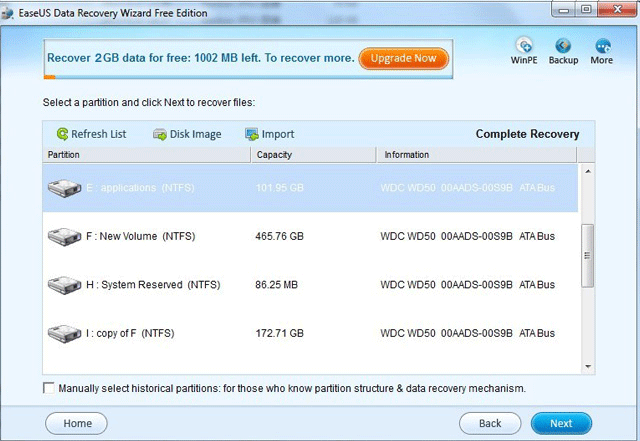
First of all, select the file types you want to recover and then you will see a list of all the partitions found from all your Hard Disk. All of your partitions are arrayed by the drive letters. For each one listed here, the Data Recovery Wizard Free Edition displays a number of statistics, including the volume label, the type of file system, the capacity, and its information. Once you have identified the partition from which you want to recover data, select the partition and then press "NEXT" to begin "Intelligent Searching". (If you are familiar with file system details, you can change "Option" before pressing the "NEXT" button).
The Intelligent Searching will scan the selected partition, collect and analyze every byte on the partition, then show you a list of partitions possible on it. In default state, the partition that was suggested in High was chosen. And the others are not chosen. This will give you a good idea that which partition will yield the best results. Select the file or directory that you want to recover and press the "Next" button, you will have your lost file recovered from formatted partitions within minutes.

Recover deleted files

Deleted File Recovery module
When a file is deleted from your computer, its contents aren't immediately destroyed. Windows simply marks the hard drive space as being available for use by changing one character in the file table so that the file entry won't be displayed in My Computer or a commandline DIR command, etc. If you manage to start an undelete process before Windows uses that part of the hard drive to write a new file, all you have to do is set that flag back to "on" and you get the file.
The built-in Deleted File Recovery Module of EaseUS Data Recovery Wizard Free Edition can do the job for you. It can get deleted files back after you have emptied the recycle bin. It can recover the deleted Word, Excel, PowerPoint, photo, email, database, and all document formats and folders in Windows 2000, XP, 2003, Vista, 2008, Windows 7, which have been emptied from or by-passed the Windows Recycle Bin.

Recover data from lost partitions

partition recovery module
Whether partition can be recognized by system or not depends on the partition table. If partition table is destroyed by virus or partition is deleted accidentally, you will not see the partition you need. In fact, the partition is not actually lost.
Partition Recovery module of EaseUS Data Recovery Wizard Free Edition is designed for quickly recovering files on mistakenly deleted or lost partitions. It will scan the entire disk to find every possible partition on it for recovery. When you select this recovery module, select the file types you want to recover and then you will see a list of physical devices that are connected to Host Computer. Choose the device from which you want to recover data and then click "NEXT" to start searching partitions on it. After the Quick Partition Searching process completes, the Data Recovery Wizard Free Edition will display a Partition List Page. Just select your lost partition and search it. You can got all the lost files back on the invisible partition soon.

Other Data Loss Solution

RAW File Recovery

raw file recovery
Data Recovery Wizard Free Edition can recover files from cases of deleted, missing / lost files and corrupt or missing drive where file system is severely corrupted or destroyed.
You should use RAW File Recovery option in following cases:
  • File system data structures of a drive have suffered serious corruption or overwriting and data recovery software cannot scan such drives.
  • Deleted File Recovery, Complete Recovery, Partition Recovery cannot locate missing / lost files and folders.
  • Files were deleted "long back" and cannot be identified because of over-writing to file system data structures.
  • Recently deleted files are not recovered because of severe fragmentation. This is a common problem in FAT file system drives. RAW file recovery can discover such deleted files and folders from the temporary copies created by the application software and/or the operating system.
RAW File Recovery scans every sector of your storage media for the lost files that you wish to recover and displays them in a tree according to the file type. The software scans the drive in RAW mode and can locate the files without the aid of file system data structures.
Limitation: Files are recovered without file names and storage paths.

Recover Images, Documents, Movies, or any other type of files

EaseUS Data Recovery Wizard Free Edition handles files regardless of their type, size or any other attribute. As long as the space on the logical drive has not been reused by operating system or new data. EaseUS Data Recovery Wizard Free Edition can successfully recover content of any deleted file.
If you want to search for unspecified deleted images or movies the best strategy is to search for common file extensions:
- *.avi, *.mpg, *.mov for video
- *.bmp, *.jpg, *.png, *.gif for images

Recover files from dynamic disk

Dynamic disks are simply physical disks with dynamic volumes on them. Dynamic disks use a hidden database to track information about dynamic volumes on the disk and other dynamic disks in the computer. EaseUS Data Recovery Wizard Free Edition can recover deleted, formatted, virus affected files from basic and dynamic disks.

Recover files from FAT/NTFS/EXT2/EXT3 partitions

The EXT2 and EXT3 are the most common Linux file system. EaseUS Data Recovery Wizard Free Edition can recover files not only from FAT, NTFS partitions, but also from EXT2 and EXT3 partition under Windows Operating Systems.

Compatible with Windows 2000, XP, 2003, Vista, 2008, 7

EaseUS Data Recovery Wizard Free Edition requires Windows 2000, XP, 2003, Vista, 2008, 7 for installation.

Mini Tools Power Data Recovery

MiniTool® Power Data Recovery Free Edition - Free to recover 1 GB data
Enhanced scan & recovery data engine with automatic error correction.

Mini Tools Power Data Recovery is an easy-to-use and all in one free file recovery software for home users. With this most effective free file recovery tool, you do not need to have technical background to use it. All the data recovery steps are logical and easy like 1-2-3. Just follow the data recovery step, and you will get your lost data back. Unlike other free file recovery software. MiniTool Power Data Recovery is very powerful and professional. It not only helps you recover deleted files, but also recovers data from damaged, reformatted hard drive as well. Furthermore, MiniTool Power Data Recovery not only recovers data from hard disk and RAID device, but also supports to recover data from CD, DVD disks, memory card, memory stick, and flash drive.

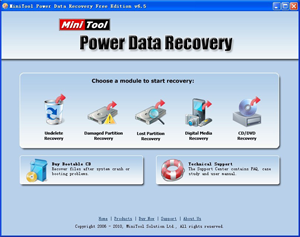
As a data recovery software suite, MiniTool Power Data Recovery includes five data recovery modules -
Undelete Recovery, Damaged Partition Recovery, Lost Partition Recovery, Digital Media Recovery and CD/DVD Recovery. Each data recovery module focuses on different data loss condition.

And we provide Power Data Recovery Boot Disk for you. With our Data Recovery Boot Disk, you could recover data after system crash, hard drive crash and booting problems without Operating System.

Please feel free to download our software - MiniTool Power Data Recovery Free Edition. We always take full virus detection on the files before we release them to the public. 100% Virus-Free and Spyware-Free Guaranteed!


CAUTION:

Do not download the software on the drive that contains lost data. This may cause disk overwrite and permanent data loss!!!


File Type:  
exe
File Size:  
5.60 MB
Version:  
6.6
System Requirements:  
486 or Pentium-class processor
IDE/SATA/SCSI hard drive
64MB RAM (128 MB recommended)
Windows 2000/XP/2003/Vista/2008/7
100 MB of free space
A second hard disk is recommended for recovery.
Supports all the 64bit Windows.
  

 MiniTool Power Data Recovery - Bootable Media Builder

(Help you to create a boot disk of MiniTool Power Data Recovery)
File Type:  
exe
File Size:  
62.2 MB
Version:  
6.6
Limitation:  
Demo version, save disabled.
System Requirements:  
486 processor
IDE/SATA/SCSI hard drive
256 MB RAM (512 MB recommended)
A mouse is required.
A second hard disk is recommended for recovery.