Showing posts with label Office and Business Tools. Show all posts

Wednesday, 4 July 2012

Word Viewer 1.0

Word Viewer 1.0 
  
With this free software Word Viewer you can view, print and copy Word documents, even if you don't have Word installed. This download is a replacement for Word Viewer 2003 and all previous Word Viewer versions.

You open Word documents saved in the following formats:
  • Word Document (*.docx)
  • Word Macro-Enabled Document (*.docm)
  • Rich Text Format (.rtf)
  • Text (.txt)
  • Web Page formats (.htm, .html, .mht, .mhtml)
  • WordPerfect 5.x (.wpd)
  • WordPerfect 6.x (.doc, .wpd)
  • Works 6.0 (.wps)
  • Works 7.0 (.wps)
  • XML (.xml)
Note: After installing the PowerPoint Viewer please Download and Install all High-Priority updates from Microsoft Update. Click Here for Download Compatibility Pack for Word, Excel, and PowerPoint File Formats.

Tags: word viewer, wordviewer, microsoft office viewer, word 2007 viewer, open word files, view doc, view rtf, xml, open rich text, opener, word perfect, free
 To install this download:
  1. Download the file by clicking the Download button (above) and saving the file to your hard disk.
  2. Double-click the wdviewer.exe program file on your hard disk to start the Setup program.
  3. Follow the instructions on the screen to complete the installation.
  4. Install the Compatibility Pack.
Instructions for use:
After you install this download, open a file in Word Viewer:
  1. On the File menu, click Open.
  2. In the Look in list, click the drive, folder, or Internet location that contains the file you want to open.
  3. In the folder list, locate the file, or locate and open the folder that contains the file.
  4. Click the file, and then click Open.

    Note: To preview the contents of the file before you click Open, on the Views menu click Preview.
To remove this download:
To remove the download file, delete the file wdviewer.exe.
  1. On the Start menu, point to Settings and then click Control Panel.
  2. Double-click Add/Remove Programs.
  3. In the list of currently installed programs, select Microsoft Office Word Viewer and then click Remove or Add/Remove. If a dialog box appears, follow the instructions to remove the program.
  4. Click Yes or OK to confirm that you want to remove the program.
  • Latest version:
    Word Viewer 1.0
  • Requirements:
    Windows 2000 / XP / 2003 / Vista / Windows 7
  • Author / product:
    Microsoft Corporation / Word Viewer
  • File size / license:
    24.5 MB / Freeware


Excel Viewer 1.0

Excel Viewer 1.0 
Excel Viewer is a handy office tool that enables you to open, view and print excel workbooks even if you don’t have Excel installed. The one thing that you cannot do is to edit the content of those Excel files, but you can freely copy the entries and use them in some other editing program. This version of Excel Viewer is a replacement for all earlier version of this program (such as Excel Viewer 97).

This download applies to the following Office applications:
  • Microsoft Office Excel 2010
  • Microsoft Office Excel 2007
  • Microsoft Office Excel 2003
  • Microsoft Excel 2002
  • Microsoft Excel 2000
  • Microsoft Excel 97
Note: After installing the Excel Viewer please Download and Install all High-Priority updates from Microsoft Update. Click Here for Download Compatibility Pack for Word, Excel, and PowerPoint File Formats.

Tags: excel viewer, excelviewer, microsoft excel viewer, how to view .xls, view xlsx format, open excel, excell, workbooks, free previewer
 
To install this download:
  1. Download the file by clicking the Download button (above) and saving the file to your hard disk.
  2. Double-click the ExcelViewer.exe program file on your hard disk to start the Setup program.
  3. Follow the instructions on the screen to complete the installation.
Instructions for use:
After you install this download, open a file in Excel Viewer:
  1. On the File menu, click Open.
  2. In the Look in list, click the drive, folder, or Internet location that contains the file you want to open.
  3. In the folder list, locate the file, or locate and open the folder that contains the file.
  4. Click the file, and then click Open.
To remove this download:
To remove the download file, delete the file ExcelViewer.exe.
  1. On the Start menu, point to Settings and then click Control Panel.
  2. Double-click Add/Remove Programs.
  3. In the list of currently installed programs, select Microsoft Office Excel Viewer and then click Remove or Add/Remove. If a dialog box appears, follow the instructions to remove the program.
  4. Click Yes or OK to confirm that you want to remove the program.
File Formats Supported
You can open only Excel files (.xlsx, .xlsm, .xlsb, .xltx, .xltm, .xls, .xlt, .xlm, and .xlw). Even though you can open macro-enabled files (.xlsm, .xltm, and .xlm), you will not be able to run macros.

2010 Features such as sparklines and slicers will not display or will give messages explaining that it cannot be displayed. If you need to view these features, use the Microsoft Excel Web App available on SkyDrive.

doPDF 7.3.382

doPDF 7.3.382(Freeware)
  • Latest version:
    doPDF 7.3.382
  • Requirements:
    Windows 2000 / XP / 2003 / Vista / Vista64 / Windows 7
  • Author / product:
    Softland / doPDF
  • File size / license:
    4.03 MB / Freeware


    Convert to PDF

    PDF stands for Portable Document Format and it was created by Adobe to ease document exchange. doPDF is a free PDF creator that does what the name suggests, creates PDF files. Once installed it will allow you to convert any type of printable documents to PDF files. doPDF7.3 installs itself as a virtual PDF printer driver so after a successful installation will appear in your Printers and Faxes list and also in the list of All Programs. Using doPDF you can convert to PDF in two ways:
  • Print to PDF via the virtual printer driver doPDF. You would do this exactly as you print to a regular printer, just the result will be a PDF file, not a printed piece of paper.
  • Using the doPDF Startup window. doPDF has an executable file (accessible from the start program group) that you can run in order to start a conversion wizard.

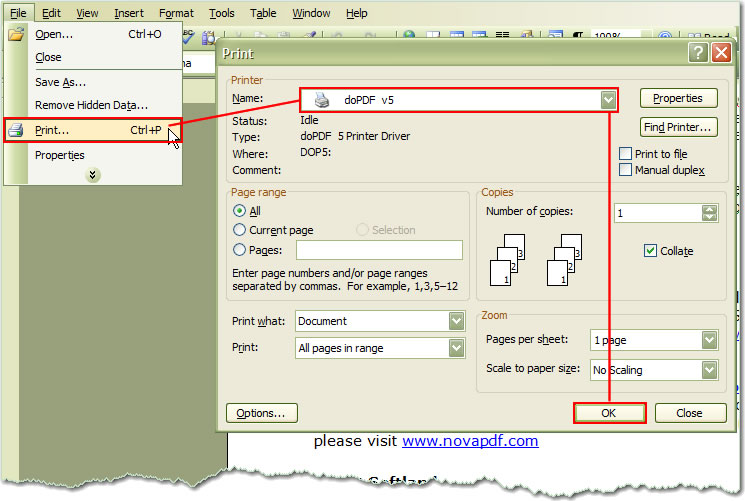
        Print to PDF via the virtual PDF printer, doPDF

Open the document you want to convert (Word, Excel, PowerPoint, WordPad, NotePad or any printable document), choose Print and select doPDF from the list of printers. You will be asked where to save the PDF file and when finished, the PDF will be automatically opened with your default PDF reader. Screenshot below shows how easy it is to create a PDF file from Microsoft Word:

  • doPDF is a free software that can easily convert your documents into searchable PDF file. After installation of this small program it will appear on your system as a new printer, and by simply using "print" command from any of your text file you can convert it to PDF archive that can be viewed by any modern PDF reader or viewer. doPDF supports all most used file extensions, most notably Word documents, PowerPoint presentations, Excel sheets, AutoCad drawings, price lists, charts, emails, web pages, marketing plans, agreements, contracts, company’s reports, workflows and many more.

    Additional features of this powerful program are support of modifying page size, resolution (from 72 to 2400 dpi), page orientation and change in image quality settings. All of this you get for free!

    doPDF's Main Features:

    Predefined page size
    You can select a predefined page size for the resulting PDF file such as: A4, A5, A6, Letter, Legal, Executive, Envelope DL/C5/B5/Monarch/#10.

    Custom page size
    If you need more customization in terms of PDF page size, you can define your own custom size for the resulting document by entering the desired width and height (you can create documents as small as 10x10 millimeters, or as large as 3276x3276 millimeters).
    Measurement units
    You can choose to have all measurements displayed in millimeters, inches or points, this way you don't have to do any conversions of your own.

    Graphic resolution
    You can set a custom resolution for images between 72 and 2400 dpi. A smaller resolution results in smaller PDF file, but lower image quality, while a higher resolution means better image quality, but bigger PDF file. The default value is 300 dpi.

    Graphic scale
    the content of the resulting PDF can be shrunk to 1% off the original size, or enlarged up to 400%.

    Page orientation
    Easily set the page orientation to be Landscape or Portrait, changes being visible in the Preview area.

    Always use this folder
    You can have doPDF create and save the PDF file to the same folder each time, no matter where you open the original document from.

    Embed font subsets
    To ensure that the resulting PDF file will look exactly as originally intended, doPDF embeds by default the font subsets used in the original document.

    Open with PDF reader
    You can choose to have the PDF opened with the default PDF reader once it's converted.

    Tags: dopdf, do pdf, pdf convertor, download dopdf, free pdf converter, pdf creator, virtual printer, convert, converter, print
     

CutePDF Writer 3.0

CutePDF Writer 3.0 
  • Latest version:


CutePDF Writer (previously CutePDF Printer) is a free tool for converting virtually any document to a PDF file. It creates virtual printer driver on your computer, which enables you to flawlessly print as PDF various different files like Office documents, text files, image files, and more. The program has no graphical user interface, and is very easy to install.

What's New CutePDF Features:

  • Added support for both 32-bit and 64-bit Windows 7.
  • Added support for both 32-bit and 64-bit Windows Vista.
  • Added support for 64-bit Windows XP/2003.
  • Seamlessly integrate with CutePDF Professional.
  • New version works with the latest version of Ghostscript.
  • To use with other PS2PDF application, please refer to FAQs.
  • Supports foreign language Windows better.
  • No longer include Ghostscript. You may download and install it separately.
Note: Requires PS2PDF converter such as Ghostscript (recommended). You can get the free GPL Ghostscript 8.15 here.
Convert to professional quality PDF files from almost any printable document. FREE for personal, commercial, gov or edu use! No watermarks! No popup Web ads! Now supports 64-bit Windows.
Version 3.0 added free CutePDF Editor.


Tuesday, 3 July 2012

Foxit Reader 5.3.1.0606

Foxit Reader 5.3.1.0606
  • Latest version:
    Foxit Reader 5.3.1.0606
  • Requirements:
    Windows 2000 / XP / 2003 / Vista / Windows 7 / XP64 / Vista64 / Windows 7 64
  • Author / product:
    Foxit Corporation / Foxit Reader
  • File size / license:
    13.98 MB / Freeware
  •  
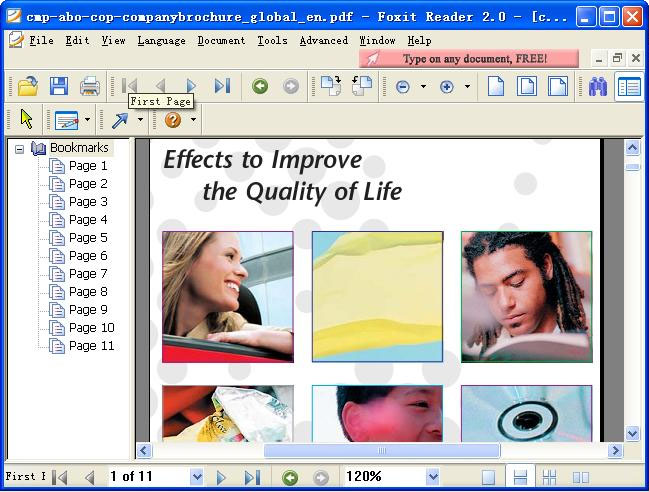
Foxit Reader is one of the most popular free PDF viewers and editors in the world. In one highly optimized package you get the basic ability to open, view and print any PDF file, but also, Foxit Reader holds in itself powerful collaboration features such as support for annotation, fill out forms, and sharing of information with social networks. This program was carefully made to require very small processing footprint, it starts and shutdown instantly (which is not a case with competition), and renders PDF files with lightning speeds.

One of the greatest advantages of Foxit Reader (besides its very small size and great speed) is its custom rendering engine which provides you with maximum protection from threats that can sometimes be embedded in the PDF files you use, and a reliable digital signature verification for exchanging authenticated files between users.

          Foxit Reader New Features:
  • Easy-to-use review and commenting tools
  • Change Your Reader Skin and Split view
  • Customize the shortcut keys
  • New editing tools include Typewriter, Callout, Textbox, and Measure tools
  • Search the comment and bookmark
  • XFA Form Filling
  • Open an RMS-protected PDF Document.
  • Active Directory® Rights
  • Support Tabbed Toolbar Mode
  • Management Service support
  • Free spell checker for comments
  • Multimedia Support: Add Images, Movies, Links and file attachments to any PDF document
  • Text Viewer & Text Converter
  • Add/Edit/Modify Bookmarks
  • Safe Mode Settings in Installation
        Operating Systems
  • Microsoft Windows® XP Home, Professional, or Tablet PC Edition with Service Pack 2 or 3 (32-bit & 64-bit).
  • Windows Vista® Home Basic, Home Premium, Business, Ultimate, or Enterprise with or without Service Pack 1 (32-bit & 64-bit).
  • Windows 7 (32-bit & 64-bit).
     

Adobe Reader X (10.1.3)

Adobe Reader X (10.1.3) (51.95 MB)
Your system: Windows XP SP2 - SP3, English
  • Latest version:
    Adobe Reader 10.1.3
  • Requirements:
    Windows 2000 / XP / 2003 / Vista / Windows 7 / XP64 / Vista64 / Windows 7 64
  • Author / product:
    Adobe Systems Inc / Adobe Reader
  • File size / license:
    51.95 MB / Freeware
    Adobe Reader is a free software tool, with the help of which you can open and print Adobe Portable Document Format (PDF) files. It's the only PDF file viewer that can open and interact with all types of PDF content, including forms and multimedia.

    Adobe Reader Top Features:

    Industry-leading security
    Take advantage of the security of Protected Mode in Reader, which helps safeguard your computer software and data from malicious code.

    Enhanced commenting tools
    Make notes and share your feedback with others by marking up PDF documents using the Sticky Notes and Highlighter tools.

    Opening PDF Portfolios
    Open and view contents of a PDF Portfolio, a collection of PDF documents, and other document types, including drawings, email messages, spreadsheets, and videos.

    Electronic form submission
    Fill, save, sign, and electronically submit forms that have been Reader enabled by Adobe LiveCycle® ES2 or Adobe Acrobat® software.

    Flash technology support
    Enable a new level of end-user interaction thanks to the ability of Reader to natively display rich media content created with Adobe Flash® technology.

    Access to all PDF files
    View and interact with PDF files that contain a wide variety of content types, including drawings, email messages, spreadsheets, videos, and other multimedia elements.

    Online services
    Directly access online services at Acrobat.com from within Reader X. Perform common tasks such as creating PDF files, securely sharing and storing documents, and screen-sharing.


    Tags: adobe reader for windows 7 64-bit, pdf viewer, print pdf, edit pdf, zoom, open pdf files, adobe reader x, acrobat, latest version of adobe reader
    Please note, depending on your settings, you may have to temporarily disable your antivirus software.

Apache OpenOffice 3.4.0

Apache OpenOffice 3.4.0
  • Latest version:
    Apache OpenOffice 3.4.0
  • Requirements:
    Windows 2000 / XP / 2003 / Vista / Windows 7 / XP64 / Vista64 / Windows 7 64
  • Author / product:
    Apache Software Foundation / OpenOffice.org
  • File size / license:144.77 MB / Open Source
     
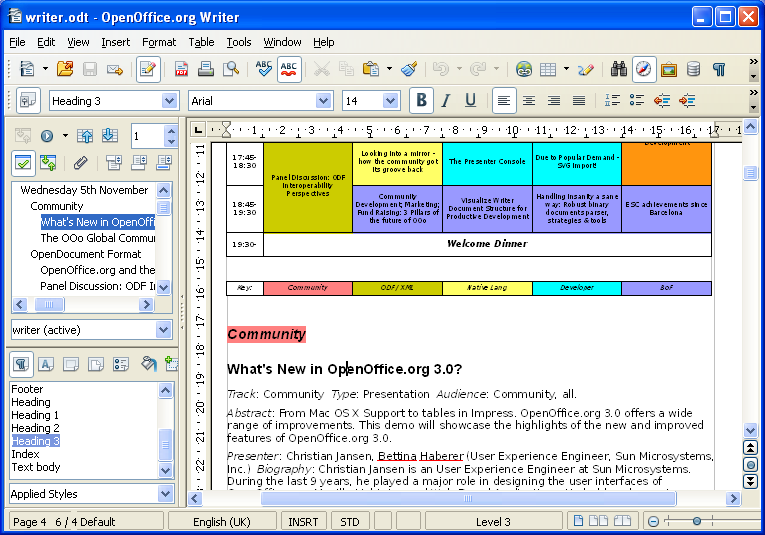
     Apache OpenOffice (formally known as StarOffice and OpenOffice.org) is a fully functional, 100% free office software, similar to the MS Office and is the leading open-source office software suite  for word processing, spreadsheets, presentations, graphics, databases and more. If offers everything that you might need from similar product – text editor (OpenWriter), presentation package (OpenImpress), database server software (OpenBase), spreadsheet program (OpenCalc), and more. It can be downloaded and used completely free of charge for any purpose.

    Product
    Compatible with other major office suites, OpenOffice is free to download, use, and distribute.

    Writer
    A word processor you can use for anything from writing a quick letter to producing an entire book.

    Calc
    A powerful spreadsheet with all the tools you need to calculate, analyse, and present your data in numerical reports or sizzling graphics.

    Impress
    The fastest, most powerful way to create effective multimedia presentations.

    Draw
    Lets you produce everything from simple diagrams to dynamic 3D illustrations.

    Base
    Lets you manipulate databases seamlessly. Create and modify tables, forms, queries, and reports, all from within OpenOffice.org

    Math
    Lets you create mathematical equations with a graphic user interface or by directly typing your formulas into the equation editor.


    Tags: apache open office for windows 7, aoo, create document, text editor, open base, open calc, word processor, office suite, word, excel, create documents